Opening a Viber business account is a great way to elevate your mobile marketing strategy. Viber is one of the leading messaging apps today with users in 190 countries all over the world, with the average Viber user is active and engaged, sending over 30 messages and launching the app 12 times daily.
Defining your business aims is key before launching your business profile on Viber. We offer two integration options for different company goals. You can choose to create a Viber Chatbot if you want to get a new audience and stay in touch 24/7, or opt for Viber Business Messages to work with your existing client database. Both integration options allow brands to reach their customers at each step of the customer journey. You can get in touch with your customers with order confirmations, delivery notifications and other transactional messages or update them with the latest products and promotional information. You will both provide better customer support and strengthen your two-way conversations. Once you have clarified your audience and goals, you are set to go further - here is your guide on how to launch a Viber business account in three simple steps.
If you want to use Viber Business Messages to your advantage, you need a verified profile. Our trusted messaging partners worldwide will assist you in launching your Viber business account and support you from the beginning till the end of your business journey with Viber to make sure you are getting the best experience. You can choose a partner from the list of official Viber partners to fit your country, industry, and aims and approach them directly, or you can also contact us and we will help to navigate you depending on your region and set goals.
Your chosen messaging partner will help you to set a Viber business account - they will provide you with all the necessary details to register you quickly and easily. During this process, you will decide on your account name and logo to establish your Viber business profile. You can share contact information, website URL, company profile and other relevant information in your official account, creating a mini-homepage for your customers. You tell your customers who you are and ways they can connect with you, then you can show you are a trusted brand and display information about your business. When Viber verifies your brand, you will receive a unique ID and move one step closer to enjoying our business solutions.
In order to send official Business Messages, all companies are manually checked by Viber. An official verified “business account” and “blue tick” will be granted once the brand accepts user privacy rules to ensure you are recognizable among customers. Your profile will display the information you have provided: logo, company description, website and contact information that users will see after pressing your brand name.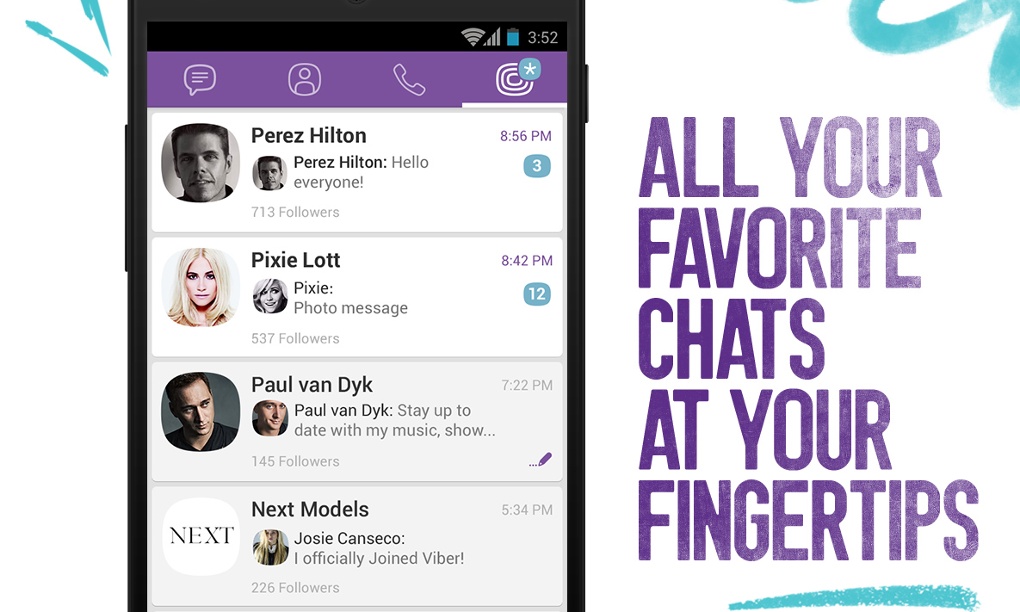
Your first message info will be shared at a glance with overlay. An overlay appears on Viber the first time you message customers - they see why they’ve received a message, who it is from and what it says. Companies utilising overlay on Viber saw their block rates drop.
Once you have an authorised business account with a blue tick, you can start communicating with your customers and benefiting from Viber Business Messages:

 It offers end-to-end encryption for private chats and calls, and encryption in transit for business messages. The messages are not stored on Viber’s servers, so no hacker can steal them. Connections with our servers are secure and HTTPS only, push notifications do not reveal the content of your message on your customer’s device lock-screen - measures we undertake so you can rely on your Viber experience.
Creating a business account is an important step in your mobile marketing strategy and at Viber, we do our best to provide our customers with premiere business solutions. With Viber for Business, you can establish your brand on one of the most popular messaging apps in the world and will start benefiting immediately with our branding, security, analytics and variety of messaging options.
Do not hesitate to contact us and start your journey on Viber.
Viber for business can be a powerful solution for companies, mainly because their chat features are great tools for customer care. You can use it for multiple things relating to your business, such as promoting your company with Viber Public Account. It makes it easier to share fresh information and product pictures with your existing customers.
🚀Read: Customer Experience Guide: How to Put your Customers First? 🚀
Consequently, a lot of businesses have recognized the potential of Viber early on. Rightfully so, considering instant messaging is a part of the daily life for many people.
Viber’s numbers are skyrocketing. The number of unique user IDs from June 2011 to March 2020 has risen from 11 million to 1.17 billion – that’s by more than a hundred times!
Picture 1. Number of Viber registration in millions
Viber was the only messaging app to claim 10 or more countries in a very short period of time. Now it is used in 193 countries and has 260 million monthly active users.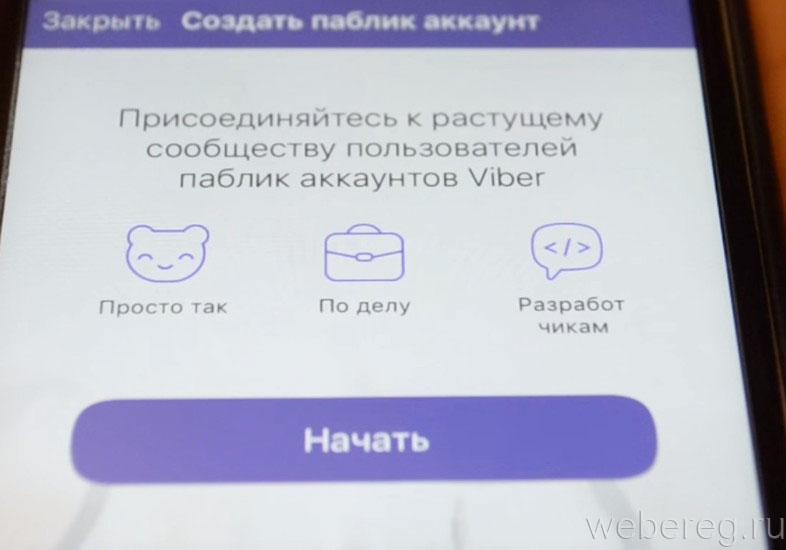 Compared to other apps, such as WhatsApp or We Chat, Viber has achieved impressive growth in a short period of time.
Take a look at some interesting 2021 Viber stats:
Viber gave you the opportunity to use a Public Account for your company. Currently, they’re no longer accepting any further applications for this feature, as they’ve launched a new product called Communities.
Public Account gives you a variety of options when it comes to your business, as users can find you among other accounts and connect with your company. It also enables users to share content with companies and create chat groups. Furthermore, they provide the ability to digitally “follow” a particular Public Chat. You can even search for content and additional information about the company, connecting the customer with your business.
First of all, you can talk to your customers immediately. That is because of the rich messaging and great interface options. Secondly, customers can reach your company the same way they’d reach out to any other of their contacts. In addition, Public Account lets you have guests, followers, and subscribers. You can it use it on Viber on Windows, Mac, iOS, Android, Blackberry and other devices such as Bada and Nokia’s Symbian. Reach your customers wherever they are, it’s that simple.
Viber for business gives companies the power to completely satisfy customers with the features they offer. Chat is most widely used as a channel of communication, as you can utilize it in a variety of different ways. This is its killer feature, sending messages between users – instantly and with minimum mobile data usage. If text communication matters to you, it’s an easy choice, as it is dedicated to users that demand message communication options.
Related: Implementing Live Chat Into the Sales Funnel
Viber’s Android app has added encryption to video clips, audio clips, and location so that your data is protected and can’t be spied on easily. Viber gives you various possibilities for real-time communication. Furthermore, It allows users to share their locations with their connections.
B2C messaging has a great opportunity to create a permanent connection with the customer. This is largely due to the fact it’s always present on the user’s smartphone, there wherever she or he goes. That way, the business stays in the palm of the hand of your customers.
It is a great tool for customer support because is simple and has great reach. Research states that customers would always prefer to send you a message over Viber than calling your helpdesk support number. It can be used to market products and services and can be used in the interaction with customers.
Viber is also great for promoting your business and making deals and sales. Using Viber for business and it’s Public Account feature, you can create a mobile promoting platform to target your customers. In addition, it offers great customer service and adds a personal touch to your communication.
Many companies like Coca-Cola, Violet’s Kitchen, 2Forks, Rafinery29 use Public Chats to reach their customers and improve their experience. For example, Violet’s Kitchen uses Public Chat to talk to their customers about their products or actions regarding these products. Users can give Violet’s Kitchen feedback, establishing a relationship with the brand.
Picture 2. Violet’s Kitchen Public Account
Picture 3. The Weather Channel and Refinery29 Viber for Business Public Account
Some employees can resist the introduction of new channels of communication because they are accustomed to simplicity. People are reluctant to learn new things, but many companies start using Viber with almost no additional employees. That’s why companies choose Viber for internal communication and communication with clients. There is an increasing number of small businesses use it to announce new offers or send greetings or wishes to their customers.
Viber for business is a great way to connect, internationally and locally. This makes Public Chat the first point of contact with your customer, which allows you to create a strong interaction and a real-time connection. Consequently, this trend will only keep growing in the years to come. Real-time conversations are the future because messaging is a hybrid between e-mail and live chat. The customer can send messages that you can respond to later.
Live chat is already a trend – customers are chatting with businesses over the Viber app. It’s predicted that it will become the prime way of communicating with customers. This is largely due to the benefits it offers for both customers and businesses.
Are you ready to use Viber for business to communicate with your customers? New business opportunities await.
Public accounts in Viber are an open profile of a public person, brand or community of interest. Any user of the messenger can connect to it to receive first-hand news, participate in discussions, and communicate with other participants. These accounts are easy to find in the "Public Accounts" section of your account. Just follow the link and select a community from the list, or search by keyword.
In this article you will learn how public accounts differ from ordinary ones, what they are and how to make your own public account.
Start placing official ads in Telegram Ads. Get ahead of your competitors!
Register and sell goods or services in Telegram Ads using a ready-made solution from Click.ru .
Read more>> Advertising
Read also: How to create a group in Viber
Public accounts in Viber appeared relatively recently. Previously, it could be created by public figures and well-known brands. To do this, it was necessary to apply, get permission, and then deal with the registration of an account and attracting subscribers. Today, anyone can register a public account. Moreover, you do not need to exit the messenger interface.
An unlimited number of participants can connect to a public account. The account owner has the right to appoint administrators and moderators who will monitor compliance with the rules of the community. The participants themselves can read the news of the public account, search for information through chat bots and communicate with other subscribers.
Differences between public and regular accounts:
 Any user can write a message to another chat participant.
 A chatbot connected to a public account will make communication even more comfortable. Through it, subscribers will find useful information for themselves, get acquainted with the rules of the community, and read interesting news.
Article in the topic: Creating sales tunnels in messengers
All public accounts in Viber can be divided into two types - communities and bots. In communities, users can learn interesting news, chat with each other, share pictures and gifs in a general chat.
Viber bot subscribers can only perform the actions that are specified in the chat bot algorithm. For example, using a bot in Viber, you can find a soul mate or quickly find a recipe for your favorite dish. It is not possible to communicate with other chatbot subscribers.
Interesting: How to send messages in Viber
To create your own public account in Viber, log in to the messenger and click on the envelope icon at the bottom screen. In the window that opens, click on the "Create Community" link.
In a new window, the messenger will show a mini-list of the benefits and features of communities in Viber. Scroll through and read them or immediately click on the "Create Community" button.
In the next window, enter the name of the public account, its description, upload a photo for the avatar.
When you fill in these fields, your community chat will open. You can upload information to it for future subscribers - for example, messages with public account rules, important information with links to the site or communities in social networks, pictures, polls, and much more.
After creating a public account, you will have to promote it. Post a link to the community in Viber on your website and social networks, send it to your contacts in your address book. And so that your public account can be found in the general list through the search, send at least one message to the chat and invite at least 5-6 people.
Online course aggregator
Before you buy any course, compare conditions from different schools - tuition fees, format, duration, whether there is an employment program. Comparison of online courses >>
Advertising
more articles on the topic:
Advertising
Public accounts in Viber appeared not so long ago. Previously, only famous people and brand representatives could register them.
To organize a Viber public, you had to submit an application, wait for permission, and only then customize the page, fill it in and design it. Over time, the app has changed its public policy. You can find information about transformations in this article.
Content
Public accounts in Viber are similar to similar pages in other social networks and messengers.
This type of account refers to an open profile of a celebrity, brand or group of people of interest, to which anyone connects.
Account subscribers learn news, discuss interesting topics, and also talk with other members.
Viber public accommodates countless account users. The owner of the page can give some participants the status of a moderator or administrator - they will monitor compliance with the rules of the community, identify violators and delete them.
Viber users can view interesting public accounts in several statuses: as a guest, reader or subscriber. The guest is not a reader or subscriber of the account, he can only view profile updates. The reader receives notifications about new content in a public chat, a platform for communication between members of a public account.
Follower status allows the user to chat with the owner of the public profile. To become a member, just send a message to your public account.
There are several types of public accounts in Viber:
 Users subscribed to the bot cannot communicate with each other. Each bot is tailored to a specific topic or a catalog of several topics at once. So, there are dating bots that will help participants find a soul mate, or bots that share records of delicious recipes with subscribers.
 A public account in Viber has several features, which at the same time are undeniable advantages:
In theory, every user can create a public account in Viber. However, this rule does not always work in practice.
It all depends on the administration of the messenger: it is she who considers user applications for creating a profile. She is also involved in the approval or denial of the request. The Viber administration is much more willing to consider applications from media people, large companies and media representatives - their applications are deleted much less frequently.
Important! Do not trust the services of unknown companies that are going to create a public for money - this is a scam.
This service is free.
Before submitting an application to create a public account, you need to make sure that you can provide the administration with the following data:
To create a public profile, you need to fill out a form, which will later be sent to the messenger administration for consideration. The application must include name, mail, phone number and country of residence.
After the request is considered, an SMS message will be sent from the messenger.
You can create a public in Viber by following the algorithm of actions:

By the way, accounts can be easily deleted and disabled at any time.
Help. The profile creation algorithm is suitable for iPhone with IOS, and for Samsung, and any other Android phones, as well as for computers.
This can be done using the messenger search engine (the "Find" button).