Last updated: Nov 10, 2022 • 6 min read
Search 1000s of TikTok & IG influencers at Hypetrace
Instagram is a perfect app two share your daily life with your followers.
From an Instagram story to a post, the app offers many options to express yourself.
However, there is a function that not many users like, and that’s: saved posts.
Some feel like it’s an invasion of privacy, while others say it’s a great alternative to a screenshot.
That’s because saving posts helps you keep track of things you like.
But can you see who saved your Instagram posts?
If you want to learn who saved your post, we’ve got some good news and bad news.
You can, but there is a small catch.
Here’s what you need to know about the topic:
Table Of Contents
Instagram has a function that allows you to see how many people saved your posts on the app.
People can save your posts regardless of whether you have a private or regular account.
But you can’t see who saved your Instagram post.
Just the amount of people who did save it.
The save feature appears as a bookmark icon opposite to the stories icon below a post.
When you save someone’s post, Instagram won’t notify the original post when you save someone’s post.
Your saved posts will appear on your Instagram profile under the settings menu.
Lastly, you can only see how many people have saved your post with creator accounts or if you have a business profile.
So if you have a regular account, you’ll need to switch.
Pro Tip: If you don’t want to allow other users to save posts, you can restrict them on Instagram. However, followers could take a screenshot image of a story or picture instead of saving a post.
To see who saves your posts, you’ll need to change into a professional account.
There are two types of professional accounts.
The process is as follows:
Now you’ll be able to see Instagram insights, a function that’ll let you see how many people saved your Instagram posts.
The View Insight gesture will appear in every post or story you create, and it’ll show a save count when you click on it.
Again, it won’t show who exactly saved your Instagram post.
There is a slight chance that you’ll be unable to post for a while when you switch to a business account.
However, you can easily fix the Instagram won’t let you post errors.
Note: Sometimes, Instagram won’t let you post various pictures to a story or post. In which case, you’ll see the try again later message pop up. It means that your post has been delayed for later.
You can’t exactly see who saved an Instagram post, but you can see how many people saved an Instagram post.
Remember that you’ll need a creator or business account to do so.
Follow these instructions to lean who saved your Instagram post:

The bookmark icon refers to the number of times that your post has been saved.
And that’s the only way to see how many people save an Instagram post.
Since you can only see how many people saved your Instragam posts and not who, other users have developed techniques to find who saved their posts.
For starters, they always check who liked their posts on Instagram.
As that can help narrow down the identity of the people saving their Instagram pictures.
Additionally, you can make a new Instagram story asking your followers directly who saved your Instagram post.
Some people have tried using third-party apps to try to see who saves their posts on Instagram.
However, as of the end of 2021, there are no apps that do so.
The answer is simple: due to Instagram policies regarding privacy.
Each Instagram account is protected by said policies, which states that no other person can see what they see or save on Instagram.
And that’s all you need to know about learning how to see who saves your posts on Instagram.
Keeping track of who sees your posts can help you create more engaging content.
Just don’t go overboard and harass people to find out.
As due to the policies of the app, you are supposed not to know how to do so.
When you save Instagram posts, Instagram won’t notify other users.
You’ll be able to save any post with the feature, including a single photo, various pictures, and or videos. However, you can’t save a Story.
You can’t tell which followers have saved a photo, picture, or video post. But with a business account, you can see how many users have saved a post.
About the author
Karen
Karen is a senior technical writer and copywriter here at GrowFollowing. Her area of expertize are social media apps and new media.
Instagram is a mainstream platform where users can share photos and videos with their friends and followers. It also gives users the ability to follow and interact with other Instagram users by liking or commenting on their posts. Today, users are now given another way to take note of a post they like—by using the save feature.
If you’re a long-time Instagram user, you might have wondered “who saved my Instagram post?”, especially when you now have a decent following. In this guide, we’ll show you how you can see who saved your Instagram posts through some effective workarounds.
Read on to know more.
Table of Contents
The quick answer to this question is: No. There’s no direct way to see who saves your post specifically due to privacy reasons. Besides knowing who liked your post, you cannot see who saved and shared your Instagram posts.
However, here are some workarounds that will give you an idea of how many users saved your post. One is by posting a story about the specific post and asking your followers, and by changing your personal account to a Business account.
There are similar questions related to Facebook (which owns Insta) such as Can you screenshot Facebook stories?
If you’ve used Instagram for a long time now and have gained followers, you can try to interact with them through an Instagram Story. This way, your followers can answer if they have saved a particular post through a poll. To do this method, follow these steps:
You can also check if followers of other Instagram accounts are seeing posts and this works with Facebook as well. With Snapchat it is a bit harder, but we have come up with a method of how to see someone’s friends on Snapchat.
Another way to see how many users have saved your Instagram post is by changing your current account to a Business account. Compared to a regular account, a Business or Creator account can be seen by anyone, which increases your account’s reach.
To switch your Instagram account to a Business account, proceed to these steps:
Once done, here’s how you can see the number of times has your Instagram post been saved, along with other statistics:
If you are taking more control of your Instagram account, you may be interested in why Instagram autofollows accounts and how to stop it happening and how to hide posts on Instagram.
Having an idea who saved your Instagram post is a handy feature, however, you can’t see this directly due to privacy reasons. Alternatively, you can see the number of times your post has been saved, along with other metrics when you switch to a Business or Creator account. This feature is most useful to have an idea of what posts create significant interactions.
Hopefully, this guide can help you in finding alternative ways to see who saved your Instagram posts. Take note that there’s no available app yet for this specific purpose—so if you see one, it’s probably a scam that’s looking forward to exploiting your Instagram account.
Social networks have become a part of our lives. Someone uses them to communicate with friends, someone runs a full-fledged business there, and someone becomes a real media personality with a large number of subscribers and followers. Additional functions thus become the necessary tool. For example, many users often ask how to see who saved my photos on Instagram.
To get access to all the functions, it is not enough just to register on Instagram. This category of hidden features also includes the ability to view statistics on posts (photo).
But there is a way out. First you need to register a business account. This is easy to do:
Everything is elementary. Now statistics have become available, and you can see on Instagram who saved the photo.
Some users are having trouble registering a business account. This is due to the fact that not everyone has a profile on Facebook. Since 2017, Insta has been bought out by this giant. And now the existence of one account without another is almost unthinkable.
If there is no page on Facebook, and it was not possible to figure it out on your own, then we will give a brief instruction.
It is futile to try to find out the statistics from old posts. It will only be available to those created after switching to a business account. To view statistics on newly added photos, just go to it and click the "view statistics" button. It is located directly below the photo.
This section will display the number of people who viewed this photo.
Unfortunately, it will be impossible to find out who all these people are. This function is open only for statistics on likes.
Like some other social networks, it is possible to save a photo (post) you like on Instagram. But not everyone knows that you can easily track who saved photos on Instagram, and how many times this was done.
This information will also be in the "Statistics" section. And, as in the previous case, this function is available only for business accounts.
Therefore, the answer to the question of how to view Instagram statistics from photos is simple. You need to switch to a business account according to the instructions presented above.
Not everyone uses this feature. But in some cases it will be very useful. For example, for users who run their business on Instagram, it will be useful to know which of the products are most popular and of interest to users. Also, such statistics will be useful for those who dream of becoming a famous blogger. With this feature, the rising star will be able to edit his content and create new posts on topics that are most in demand among his audience.
It's no secret that Instagram has long ceased to be just a place to save photos, as it was originally planned. With it, you can quickly promote your business or yourself. But there are often scammers. They steal content and create copies of pages. In this case, you can lose not only subscribers, but also the trust of potential and existing customers.
And if it has already been written above about how to find out who saved my photos on Instagram, then we need to talk about screenshots separately.
The fact is that until recently, scammers (and not only them) saved the necessary photos in this way, remaining invisible to statistics.
Things have changed relatively recently. Now the developers have added a free feature that notifies who took a screenshot of a profile or an individual post. In order to find out, there is no need to download additional applications and programs. Notifications about the fact of "photographing" the page will come automatically. Moreover, this will not be simple quantitative statistics, but information indicating the profile of the attacker (well, or just a secret admirer). So, you can easily track the future fate of the content. The obvious disadvantage is the fact that the function only applies to content posted in stories. It is still impossible to find out who took a screenshot of a post or photo.
If you follow all the instructions above, then the question of how to view all the necessary statistics on posted posts and photos on Instagram should be resolved. It is important to note that all statistics sections will be available only to the account owner. The rest of the users will still only have access to information about how many likes a particular post got and how many reposts there were.
Menu
Content
Instagram now serves not only to entertain the user, but also helps to find a job, gain knowledge, and make new acquaintances.
The versatility of the functionality affects the development of the site, so many application functions are available to users. One of these is saving photos. It appeared recently, so it often raises questions.
Even experienced bloggers may not know how to see who saved a photo on Instagram. This article deals with a similar question.
It will not work to understand who saved your content, because Instagram does not provide user data in this format. The only thing that is available to you from such information is the number of saves.
You can find the data using the instructions below:
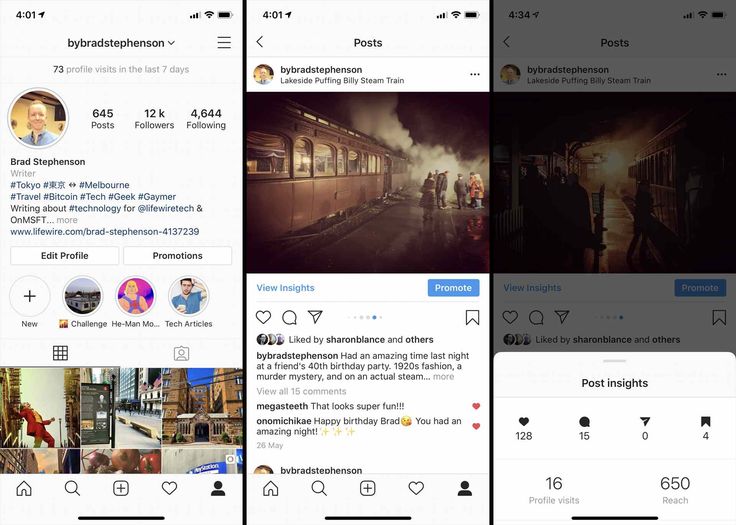
This is the total amount of information that is available to the user about the "Saved" function. But this is only available if you have a business account enabled.
You can switch to this type of profile in a couple of steps:
If you have not yet registered a business account, follow these steps:

The functionality of the business account will be available immediately, so you can view statistics on Instagram after you enter the application.
The nuance of the procedure is that the data will be available on those photos that you put in your account after registration. Information about old images will be incomplete or completely missing.
The option is available to every user in the application, and it is often used for the following reasons:
The reasons to add a photo to the saved are constantly increasing. It is important to understand that this is a user-friendly tool that simplifies the work in the application.
You can add files to the “Saved” section in a couple of seconds.
When saving an Instagram post, you can select a folder.
You can find files by logging into your account and opening settings. There is a "Saved" item. If you tap on it, you will be taken to the desired menu with folders.
Instagram, like other social networks, is plagued by scammers. They create accounts of well-known bloggers, steal content, gain an audience and then deceive it for money.
You won't be able to detect a scammer by viewing statistics for images, but a new platform feature — notification of screenshots — gives you such a chance. It works with respect to stories, but it shows all the information about the person who took the screenshot on Instagram.
Set up alerts so that you are notified when another user takes a screenshot. You can immediately find the attacker and file a complaint against him.
There is no absolute protection against scammers, so you need to analyze for suspicious accounts and inform your audience about it. This is important for large bloggers, as money can be extorted on their behalf, and this affects their reputation.
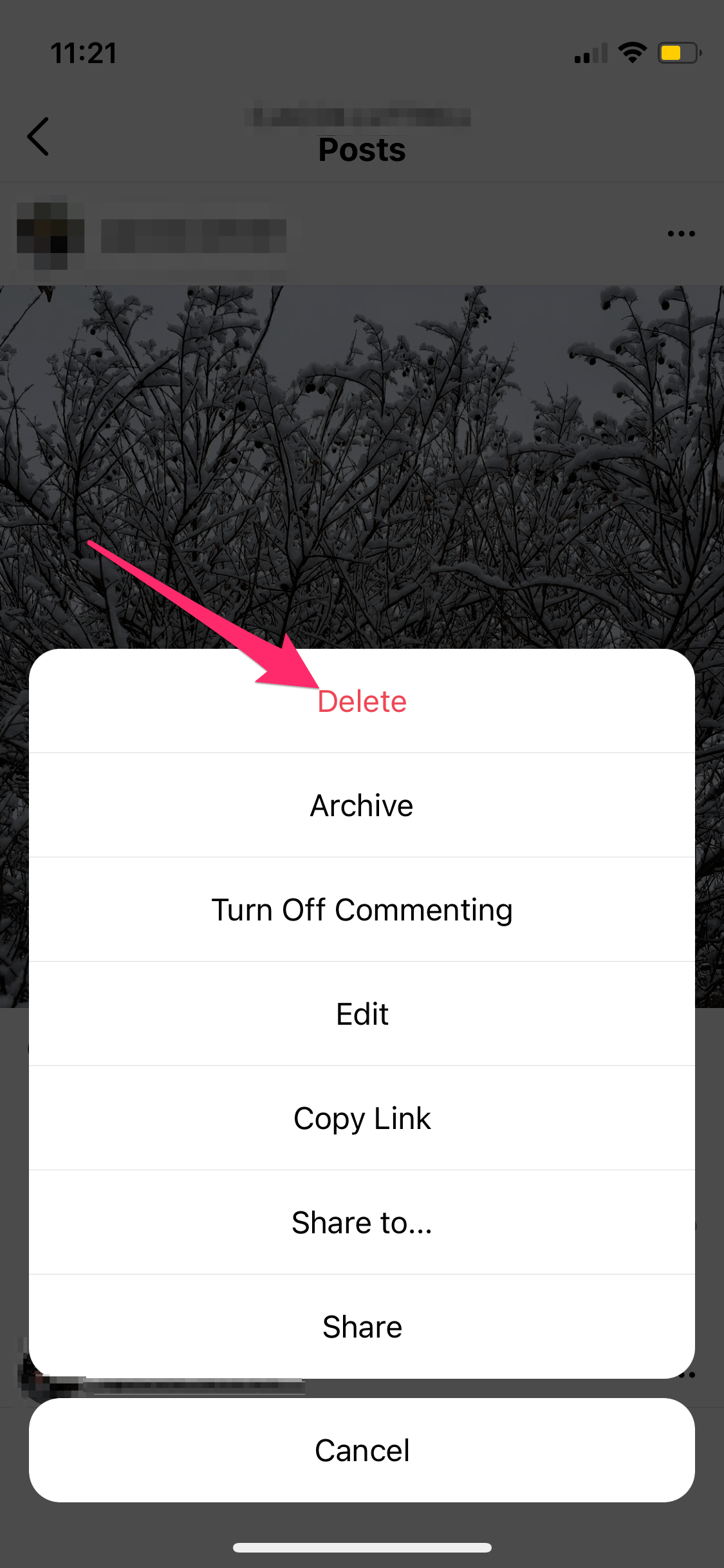
If you no longer use the video or image in your saves, you can delete the content. To do this, open the "Settings" section and go to "Saved".
Go to the folder where the desired content is stored and tap on the video, broadcast or photo. Under them there will be a familiar flag, but already white. You need to click on it again so that the material disappears from the folder.
If you go to the page of the person whose file was saved and want to remove their content from "Saved", open the image, broadcast or video and tap on the flag.



.jpg?width=626&name=3%20(1).jpg)