So if you’re a business that has a conscious social media marketing strategy, you may have found yourself asking, how do Instagram promotions work?
Let’s start with a bit of background on Instagram promotions and the features open to businesses on Instagram.
Takeaways
An Instagram promotion is similar to any other ad you may see online.
It allows increased exposure to your brand’s content by targeting desired users that may be interested in your brand’s products or services.
In the last couple of years, Instagram has been rolling out bundles of features to help businesses utilize the massive reach on their social media platform.
These include a plethora of new promotional ad features, analytics, and quality of life improvements.
This is especially helpful for businesses when you take into account what separates Instagram from other social media platforms.
As you can tell from this study done on user engagement with brands, Instagram blows other platforms out of the water when it comes to…
…getting to know your audience.
With a more attentive group of followers, you are much more likely to drive conversions on Instagram vs. other social media.
The first major change they rolled out was in 2016 with the addition of business profiles.
Instead of having to brand personal accounts, businesses that operate a Facebook page can now operate commercial accounts equipped with…
…tools that go beyond your personal profile.
Instagram even gives you the ability to switch back to a personal account if you so desire.
Some people claim that Facebook and subsequently Instagram’s algorithm ranks personal accounts higher than brands.
Let Us Grow Your Revenue...✅ Increase revenue with done-for-you marketing
✅ Custom marketing strategy backed by data and results
✅ Affordable marketing services with no long-term contract
But that has not been found to be the case while Instagram pushes businesses to convert.
Some of these include:
A dedicated contact button instead of having to bury the information in your bio.
Being able to designate a category/industry for your business
Access to Instagram Insights. This a huge one.
Instead of relying on likes/comments, you can see deeper analytics on your engagement, reach demographics, and impressions.
The ability to post ads vs. simply ad style posts.
These appear as sponsored posts in a feed/story and come with countless targeting specifications, ad styles, goals, and payment types.
Influencer marketing integration. Since the FTC cracked down, influencers are required to disclose earnings from promotions they push.
Business accounts can tie themselves to their paid posts with the ‘Paid Partnership’ tag so that…
…they can remain compliant as well as get analytics on the content they didn’t post themselves.
One of the features that we are going to dive into, that came alongside all of Instagram’s improvements, is the ability to promote your posts as well.
How do Instagram promotions work to make my business grow?Have you ever heard of social proof?
It’s the concept that higher engagement through reviews, testimonials, shares, and other popularity metrics contribute to your credibility as a business.
This seems obvious, but it is the game that surrounds social media.
People look towards other people not only for validation but also for the next big thing.
And that’s not a bad thing.
In the fast-paced, high-information world we live in today, how likely is it that quality content is going to…
…get passed up by everybody unless technical execution is the pain point?
If you can get your post to receive traction through engagement, it turns into a snowball effect where…
…more people are willing to like, comment, and convert if they see others are doing the same.
So how do Instagram promotions work on my social proof?
Instagram promotions’ biggest use case is creating brand awareness.
By boosting a post, you can kickstart the snowball effect and get posts the traction they deserve.
This helps skyrocket reach and is very effective if your primary goal is high visibility.
Instagram’s algorithms, much like other social media platforms, operates off of an acceleration/virality factor.
This means that the quicker your posts get off to the right start, the higher the ranking algorithms will put you in the feed.
And how could you blame them? There are more than 800 posts made per second on Instagram across over 1 billion monthly active users as of 2018.
People have their work cut out for them to get visibility, but it has been done time and time again.
Instagram is one of the fastest growing social media platforms.
And since they launched business accounts in 2016, it has come to be expected for your business to have its own profile.
Instagram has found that 60% of users say they learn about new products or services on their platform.
What’s even more astonishing is that 75% say that they will take action after seeing a post.
This includes visiting sites, purchasing products, or even sharing posts, what every business dreams of.
How do Instagram promotions work different than ads?Instagram helps businesses get a little bit more juice out of their posts through their promotions feature.
Much like Google or Facebook Ads, you can accelerate your reach through a pay to play system.
Instagram operates their ad/promotion structure on a Cost-Per-1000 Impressions (CPM) basis.
This means that you pay the specified bid amount on your post for every 1,000 people that see it.
Other platforms like Google Ads operates on a Cost-Per-Click (CPC), where you receive free visibility and only pay for successful clicks.
Because Instagram values visibility you will have to put work in to optimize posts so that you reach your goals without wasting too much money.
However, there is a difference between ads made through the Facebook Ads manager and promotions (ads) made through the Instagram app.
That is an important distinction to make.
Before you can understand the answer to how do Instagram promotions work, you first have to understand what an Insta promo is.
Instagram Promotions are normal, non-advertisement posts that you would like to convert to a sponsored post with elevated reach.
They can appear in the same spot with the same ‘Sponsored’ tag, but Instagram treats them differently in their algorithm.
This is because there is a nuance in each of their purposes. While each are there to increase visibility and engagement.
An Ad has many more preferences for targeting and customization because the leading purpose is to convert.
Promotion serves to take a well-performing post to the next level in terms of profile views, likes, comments, and shares.
If visibility, reach, and engagement is your goals, then think about opting for the boosted promotion.
Take a look at the interfaces that Instagram provides for promotions (left) vs. ads (right).
You may be asking yourself, why would I use promotions over ads?
Remember, the purpose of boosting an Instagram post is to receive the maximum amount of visibility and reach as possible.
It is not always necessary to launch an entire ad campaign every time you want to spike brand awareness.
Instagram knows this, which is why they offer it as a feature.
Its purpose is to convert quality posts into mainstream, targeted ads so that you can share its value with people beyond your normal audience.
While sales and lead generation remain paramount, social media accounts require nurturing through a variety of posts.
Too much of the same is never good for anyone or any business.
An effective social media marketing strategy will incorporate a healthy mix of both promotions and ads.
Are Instagram Promotions More Expensive or Cheaper than Ads?There actually isn’t any conclusive data that states that ads are cheaper than promotions.
However, AdEspresso reported that CPC values range between $.70 and $.80.
This figure was concluded based on two demographics. Users between the ages of 25-34 years can cost as much as $1. 23 per click.
On the other hand, the younger group aged between 13-17 years, came in at $.47.
How Do Instagram Promotions Work and How Can I Start?If you’re reading this, you are probably a business owner looking to jump-start your social media accounts.
Or, you want to know how to get more out of your posts by understanding how do Instagram promotions work.
Instagram promotions start with a business account.
You probably already have one, but if not, don’t worry. Any personal account can become a business in a few simple taps.
Go into your Instagram Settings and halfway down the page tap on Switch to Business Account.
If you do not already own a Facebook page tied to your business, it will make one for it.
If you don’t have one it would be in your best interest to make one first and populate it with company info.
Customize your profile with custom buttons, such as a contact button or a link to your website.
Be sure to put in all your contact information before finishing up.
Once you have transitioned to a business account, you are all set to promote your first post.
To get started, navigate to your profile and tap the Promotions button. You will then be prompted with a screen that looks like this.
Choose which post of yours you would like to convert into a promotion and proceed forward.
Next you will be prompted with a screen where you get to decide on your post’s Call to Action (CTA). These are your Call Now’s and Learn More’s.
This part is highly dependent on your goals with this promotion. So take the time to evaluate your options.
You opt for something simple like directing people towards your profile or direct messages.
Or you can redirect them to your website. If you choose storefront, you have the options to send them to a phone number or physical address.
If you choose your website, you have more flexibility because you can assign different CTA’s like Learn More, Contact Us, Book Now, and Sign Up.
After you decide on your CTA, Instagram asks you to select your target audience.
They give you the option to choose between Automatic or Create Your Own.
If you choose to manually define your audience, you will be presented with this screen.
This is where you get to define demographic presets to use in the future.
As you can see, Instagram provides basic parameters such as location, age, gender. But you also are given the ability to target certain interests.
Instagram allows you to choose up to 10 interests that you think accurately represents your intended audience.
This is where you can make the magic happen and really maximize your audience targeting capabilities.
Interests range anywhere from hobbies, movies, events, to people.
So after you have solidified age, gender, location, and interests, you now have a working demographic of people to promote to.
After everything is said in done, Instagram prompts you with one last page. This is where you get to decide on your budget, duration, and distribution.
Instagram gives you a loose estimation of your reach depending on your daily budget and how long you would like to run your promotion.
Instagram also decides if stories or the feed would be better for your selected audience.
Instagram’s maximum limits are set at $1,000 ad spend daily and up to 30 days in duration for a maximum possible reach of 400k-1 million people.
Of course, promotions come with diminishing returns, so you need to look towards your analytics to determine the worthwhile-ness.
Thankfully Instagram breaks down your promotion analytics in their Insights feature available to (as you’ve guessed it) only business accounts.
Instagram InsightsInstagram recommends spending at least $10 to promote your post.
But ultimately it is up to you to decide what the value of these promotions are for your business.
Instagram Insights lets you keep tabs on all types of engagement people are having with your profile, including those attributed to your promotions.
You can track anything like:
The list is very comprehensive and even breaks down the timeline and demographics on all of these types of engagements and impressions.
Nailing down your audience is where most of your market research is going to be directed towards outside of creating compelling content.
On the Insights screen, find where your posts are located.
You should be presented with a screen that shows all of them in a grid with numbers overlaid like the one above.
Here you can apply filters to segment the data for each of your posts for a specified time period.
This will give you the quick run down on your best and worst-performing types of content as well as the levels of engagement you are getting.
Filters include:
If you would like even more detailed analytics, find the View Insights button on the respective post and…
…you can find a breakdown of the actions taken from the post such as:
You can also get a similar breakdown of actions taken from Instagram stories such as:
Instagram also generates an in-depth report on the sources of impressions as well, like:
While this is all helpful for analyzing your posts, lets focus on promotions.
When looking at insights for promotions, Instagram actually gives you a more stripped down overview where…
…visits, impressions, engagement, money spent, and audience demographics are the only factors they provide to you.
It is more or less up to you to decide whether or not the promotions are beneficial.
One of the ways you can accomplish this is to track the data yourself and generate cost breakdowns.
Some intrinsic metrics you should keep track of are:
The ratio of engagement to reach. This will let you know how compelling your content is and if it leads to conversions.
Your CPC. This isn’t directly provided by Instagram, but you should be conscious of how much is being spent on promotions and…
…specifically how much it costs per website visit, contact information shared, conversions, etc.
Although posts receive a bit more analysis, you can use them to your advantage when tuning your promotions.
After all, promotions are just boosted posts.
One of the first things you should analyze is your audience. Are you reaching your intended demographic?
Is there consistency in your demographics from post to post to promotion?
Next, you should consider what actions people are taking when they see your promotion. Does your promotion have the intended effect?
Much like a website, bounce rate is a key metric to determine your content effectiveness.
Low reach and low engagement would be indicative of ineffective content.
Decent reach with low engagement means that although you are reaching the…
…intended audience, your CTA’s are ineffective, or the content is not conducive to engagement.
Polishing Your ContentBut how do Instagram promotions work using your content?
Instagram promotions are a great way to get that boost in reach that your posts need. But if the content is unrefined, its message will fall on deaf ears.
Insights and other forms of analytics will definitely help guide your content and highlight pain points.
However, creating content that will resonate with your audience is a different beast and will need a more holistic approach.
Effective content needs to be interesting, memorable, and actionable. To achieve this, you need to be mindful of commonalities in your consumer base.
One of the best ways to take the guesswork out of content creation is to employ social listening.
Social listening is putting your ear to the ground to hear what people are saying and finding what trends are hot in your industry.
There are countless software out there to help you keep track of the conversation.
In essence, you are trying to nail down consumer sentiment when it comes to your brand, certain types of products, and even your competition.
Social listening can aid your Instagram promotions by:
Social listening has become an industry standard, and it helps seal the leaks in your marketing budget.
If you would like to learn how to go about incorporating social listening into your marketing strategy to create the most relevant content.
Think about itSo hopefully the question of how to do Instagram promotions work has been answered.
They can give you that boost in reach that you may be lacking. But promotions aren’t the only piece of the puzzle.
If you would like a higher-level overview of what you can do to promote your business on Instagram.
Learn how to promote your Instagram page for greater brand awareness of your business.
Successfully optimizing your Instagram promotion campaigns can be quite time-consuming.
Join over 50,000 marketers who get exclusive marketing tips that we only share with our subscribers.
SIGN-UP
While Instagram provides its analytics on your content in an intuitive interface.
Getting the most out of your posts and ads isn’t as easy as it makes it out to be.
In fact, it’s not uncommon for businesses of all sizes to find a helping hand when managing their social media accounts and advertising.
Integrating a team of professionals insures that your marketing budget is not wasted and that you are receiving at minimum, the industry standard.
At LYFE Marketing we live and breathe social media management and marketing.
We have helped countless people realize their business goals by meticulously crafting impactful marketing campaigns through constant optimization.
If you’d like to get more exposure and conversions out of social media, contact us today.
We offer both social media management services and social media advertising services so that the full package is at your fingertips.
Our specialists have experience across dozens of industries so that we ensure the best quality.
If you are interested in taking your social media game to the next level or would like to discuss our suite of other services, schedule a free consultation.
How do Instagram promotions work? And why would you use them instead of ads? Good questions.
In this article, we’ll explore answers to these and other equally important topics related to Instagram promotions. We’ll also show you how to create your very own promotion.
Back in 2009, monetizing Instagram wasn’t a clear path for the photo app. In fact, while the idea was definitely on the table, the brand had to evolve into something with a stronger value proposition and product.
Today, Instagram’s caught up to the rest. 80 per cent of accounts follow a business on Instagram. This means more people are interacting with brand pages and this level of engagement is just what Instagram needed to be able to broaden it’s advertising offerings.
Source: statista.com
The photo-sharing app offers four advertising options in addition to promotion options.
These include:
Photos:Image: Instagram
Image: Instagram
Carousel:
Image: Instagram
Ad in Instagram Story:
Image: Instagram
Collection Ads:
Image: Instagram
Instagram also offers promotion options. These are different from photo, video, carousel and story ads. Here’s what you have access to and how they work:
Promote a Post You've SharedFamiliar with boosting a post on Facebook? Promoting a post on Instagram works the same way. If you have a picture or video that’s drummed up a fair amount of likes, comments and shares, you can promote it.
This option is a great way for businesses to get extra awareness for content they publish. The extra awareness is reach that could help feed your marketing funnel.
Promote a Story From your Profile, Highlights, or Stories ArchiveAlso similar to boosting a Facebook post, you can promote stories. While limited to those taken with the Instagram camera or in a vertical format, the option is still very useful.
Some creative elements (filters and stickers) are not accessible when promoting stories, however, this shouldn’t stop you from taking the opportunity to ‘capture authentic moments that speak to your business,’ as Instagram recommends.
Create a Promotion From the Promotions Button on Your ProfileIf you’re looking for a quick and direct way of generating results, you can do so with a fresh new ad campaign.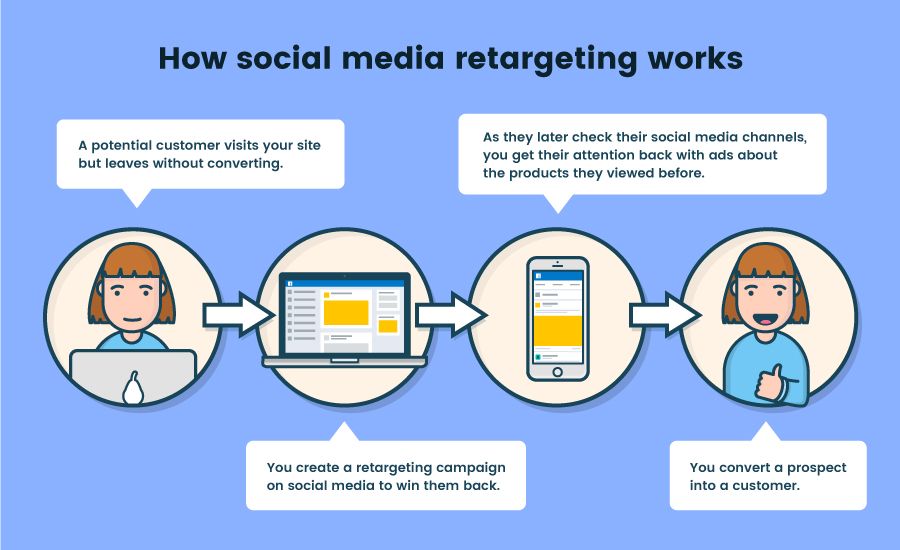 These can be created from your business profile. In the process, Instagram will recommend which posts they think will do well as advertisements. This option is best if you're unsure which post you'd like to promote.
So, to recap, the major difference between ads and promotions on Instagram is related to the way you use each option to engage your brand.
Promotions are used to generate extra awareness and engagement from already successful posts and stories. Ads are used for unique campaigns and generally feature new content.
While Instagram promotional posts, stories and highlights look similar to their original (organic) forms, they include additional elements.
Post, stories and highlights all include the “Sponsored” label below the account posting the promotion.
Image: Instagram
Image: Instagram
As promotions are intended to generate some result, they also come with calls to action. Here’s a list of the options available:
Promotions appear as posts and can also appear in stories. If you’d like to isolate your promotion to appear in one place, you’ll need to create your promotion in Ads Manager.
Algorithmic updates are generally not the easiest to track. In fact, while there are many digital and social marketing circles that constantly test content to generate the best possible results, much about the intricacies of how AI and machine learning influence ad placement, reach and overall campaign success is largely unknown.
There are, however, a couple of interesting ideas we think you should bear in mind when creating your promotions.
Promotions are all About ReachWhether testing to find the higher-converting ad or scaling to generate more of the results you’re after, all spend on paid media should be made to generate results. When it comes to what we know about promotions, Instagram recommends that you use “a post that your followers really enjoyed.”
This means using content that’s received its fair share of likes, comments, and shares.
Why would this matter and how can you use this information?
Ad Revenue and Engagement Fuel InstagramInstagram, like all other social platforms, wants to create products that users constantly access. The more users using their app, the more ad revenue they are able to generate.
Instagram also knows that when users show interest in a certain piece of content, there’s a higher probability of generating even more engagement from it if it’s shared with a larger audience.
Your already successful posts, stories and highlights, therefore, stand a better chance of being more successful with a wider audience. While we’re not sure about the intricacies of their algorithms, this logic is pretty sound.
There isn’t any conclusive data that shows ads cost more or less than promotions. In a report, AdEspresso found that CPC values range between $.70 and $.80. This average was based on two demographics. Audiences between the ages of 25-34 years can cost as much as $1.23 per click, where a younger group, aged between 13-17 years, came in at $.47.
While we haven’t seen any data on promotion costs, they could be close to these figures considering that you’re still paying to reach the same audience.
Creating your promotion is relatively easy. In fact, most of the heavy lifting is done for you. For example, you don’t need to worry about which post to promote because you’ll have data that shows which post received the most engagement.
Set up Your Instagram Business ProfileTo get started (from your phone), open Instagram and visit your business profile. If you haven’t switched to a business page for you your company, you’ll need to make the change.
Instagram business profiles are linked to Facebook pages. To switch to a business account, go to Settings > Switch to Business Profile.
Image: Instagram
Next, add custom buttons to your account. These can include:
Note: if you haven’t added a link to your website and a bio, nows a great opportunity to do so.
With the setup of your business profile taken care of, it’s time to create your promotion post.
Start by accessing the Promotions options via the Promotions button. Next, locate the post you’d like to promote.
Image: Instagram
Note: if that if you’ve never posted any content to your business profile, you’ll first have to publish a post and then start the process over to promote it. Also, if you already have content posted, Instagram gives you the option of promoting posts directly from your business profile.
Image: Instagram
Select Your PostIf you’re promoting a post from the Promotion button, you’ll then need to select a post to promote.
Choose your post and it will open with the option to View Insights or click on the Promote button. Viewing insights will show you how well your organic post performed. This also helps you determine whether this is the post you should really be promoting.
Image: Instagram
Set Your GoalNext, select your goal.
Do you want more profile visits, more website traffic or more promotional views?
Image: Instagram
Establish Your Target AudienceHaving selected your goals, it’s time to select your target audience. Instagram makes the process of establishing your target audience easy. Here are the three options available:
Image: Instagram
Set Your Budget and Promotion DurationSetting your budget is just as easy as previous steps. Instagram provides a daily budget option along with a duration (in days).
While setting both, you’re able to get a summary of the estimated profile visits and reach for your promotion.
Image: Instagram
Review Your PromotionThe final step of the promotion creation process is a review. You’ll be able to see the following:
Once reviewed, click on Create Promotion.
It’s a good idea to keep tabs on how your promotion performs. This will help you determine whether to increase spend and duration or terminate the promotion altogether.
To view insights, open Instagram > go to your business profile > select the post you'd like to view insights on > below the post's image, tap View Insights.
Clicking on View Insights will show you:
Instagram Promotions are one of the simplest ways to engage and reach a larger audience. Promotions can be created from posts, stories and highlights. When created, they appear in audience feeds and stories.
While there are creative limitations, using promotions is still valuable. They help brands connect with audiences using authentic creative content. Instagram’s budget and duration options make it easy to determine the spend and length of a promotion, and insights will give you information on how well your post is performing and how much money has been used.
This material is for those who want to learn how to promote a post on Instagram directly from the application or through the Facebook advertising cabinet.
In this article, we will show the nuances of promoting a post on Instagram, give recommendations on choosing a photo or video for promotion, and also answer frequently asked questions related to errors in the operation of the “Promote” button.
Advertising: 2VtzqwCpaPT
nine0002 Read also : How to promote an Instagram account from scratchIf you need a quick launch of an advertising campaign, then promotion of an Instagram post is exactly what you need. The "Promote" button below the posts will appear when you switch to a professional account: a business profile or an author account.
What does the "Promote" button mean? When you click on the "Promote" button, an advertisement is automatically created with the selected post. This function can also be called, raise a post or bring a post to the TOP, because it will be shown one of the first in the feed.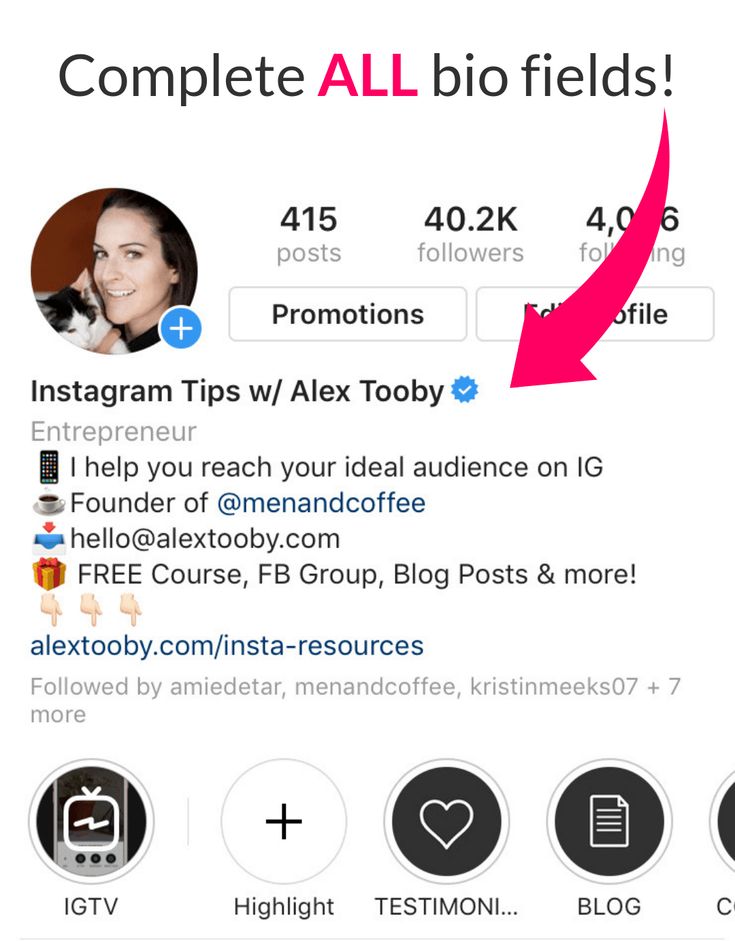 nine0003
The button looks like this :
How does it work? This feature allows you to create and run ads through Instagram without using Facebook Ads Manager.
At the same time, promotion will not be available for some posts, in this case the “Promote” button will be displayed, but will be inactive.
Interesting : Top 10 courses by target
Step 1:
Decide what problem you need to solve with the promotion of the post and what would be the best solution. Here are 3 types of content that can be promoted:
If the goal is to attract customers, prepare a sales post for Instagram, if the goal is to get feedback, then make an engaging post. After selecting a publication, open it and click the "Promote" button below.
Tip: Prepare your promotional publication in advance. Use an image that catches the eye easily or post a photo with a caption.
The most important thing in the text is the first line. This is what the user sees when scrolling through the feed. Try to interest from the very beginning, and end with a call to action: leave a comment, go to the site, register. nine0010
Step 2:
Next, you need to select the promotion goal: site visits, profile transitions, or Direct messages. Let's choose "More site visits" - suitable if your main sales go through the site. To set the desired address, click edit and specify the desired URL.
Select the action that suits your ad campaign. If you want to attract new subscribers, then we select transitions to the profile. If you need more contact with customers - messages. If advertising is the first stage in an auto funnel, then send traffic to a lead magnet or give a checklist as a gift. nine0003
Step 3:
Different call to action buttons will be displayed depending on the target of the ad post:
For the button that will accompany the advertising publication leading to the site, you can change the label on the button. Available options: Learn more, Shop, View more, Contact us, Book and Register .
When choosing an action button, rely on what you are promoting. For events and online services, the "Register" button is suitable, for hotels, cafes and restaurants - "Book".
Step 4:
You can leave automatic audience selection, select a previously created audience or an audience for retargeting, or set it up manually. Consider the last option - click "Create your audience". nine0003
We come up with a name for the audience and set up targeting: location, interests, age and gender.
To properly target, first create a portrait of your target audience.
Step 5.
To begin with, it is worth setting a small budget for a short promotion period.
To change the budget and duration of an advertising campaign, simply move the slider left or right. At the same time, you will be shown the approximate coverage that you will receive. nine0003
Step 6:
At the final step, see how the promotional publication will look in the feed - the "Publication Preview" button. Check if all options are set correctly.
Here we set up payment. Click "Payment", a section opens where we replenish the advertising budget from an already linked card or add a new one.
Finally, click "Promote Post". The advertisement will go to moderation, upon completion of which you will receive a corresponding notification. How long does it take for a post to be reviewed? Usually results come within a day. nine0003
To view statistics on the promotion of a publication on Instagram, go to the advertising publication - click "View promotion" and then "View statistics".
Since our advertising campaign has not been launched yet, there are zero indicators here. When the statistics data is updated, it will be possible to calculate the cost of a click, the cost of one application or registration.
In the same way, you can set up promotion of an Instagram post via Facebook. If we compare this method with the method described above, then setting up through Ads Manager gives more options. For example, launching a promotion from a computer and more accurate targeting. nine0003
We will not describe the whole process in detail, we already have a corresponding article: Setting up advertising on Instagram through Facebook. Start setting it up.
Next, when creating a creative, you need to select "Use an existing publication".
Then click the "Select a post" button
In the window that opens, switch to the "Instagram" tab and select the post that we will promote.
After selecting the publication, you will need to select the action button and provide a link to the site (if selected as the goal). nine0003
At the end, click "Publish" and the advertisement goes to moderation.
There may be several reasons:
 On the territory of the Russian Federation, the Facebook advertising account in conjunction with Instagram does not always work stably, so the problem with the “Promote” button can literally arise out of the blue. Solution: from a business profile, go to a personal profile, and then connect the business account again;
 So, I hope this manual was useful. If you have any questions, ask them in the comments.
Useful links :
Comparison of online courses
Before you buy any course, compare conditions from different schools - tuition fees, discounts, duration, whether there is an employment program. Find an online course >>
Advertising
More related articles:
Advertising
Advertising
Good afternoon! Lyudmila is in touch, a marketer at Altcraft. Instagram already has 1.3 billion users, photo and video content service is one of the top social networks in the world and continues to grow. Instagram brings money to brands and bloggers - it is the most effective platform for influencer marketing in 2020-2021. Bloggers earn up to $10,000 from one advertising post. Brands increase the audience, increase loyalty and sales - 90% of Instagram users are subscribed to commercial accounts.
57 115 views
Instagram is a rapidly changing social network with unpredictable algorithms. There is huge competition here, but the question of how to promote Instagram for brands and bloggers remains relevant. We tell you what will work and what will not work in 2022: how to promote a blog on Instagram using free and paid promotion methods.
Before the start of promotion
nine0015It is useless to start development without strategy and account preparation. Therefore, first:
What's important:
Example. Instagram sees: only 10 out of 1000 subscribers watch your content. The social network understands that the content is uninteresting and stops showing it. Subscribers by themselves are not an indicator of the success of an account, it is important to involve the audience. nine0303
Free promotion methods
Reels
Reels is a short video format (15-30 seconds) that Instagram launched worldwide in the summer of 2021. The social network also promised to promote the video format. Therefore, now Reels is the most effective way to promote your account for free. Social media gives Reels an outside reach. If stories and posts work for an existing audience (although posts also sometimes get into recommendations), then Reels has more opportunities. Getting a million views for an account with a couple of thousand subscribers is real. nine0003
Another advantage of Reels for promotion is the lifetime. Stories disappear after 24 hours, the post is shown for a couple of days, and Reels “spins” even after a while. Also, one video in Reels can “pull” others along with it: the social network sees that a particular video is interesting to the audience and shows the previously created ones.
Sample Reels
Commenting
Don't confuse this method with spam comments for everyone. Popular, but meaningless, remains automatic commenting. With this method, there are situations when the inscription “what a beautiful photo” appears under the mourning post with a candle, or there are off-topic comments. You shouldn't do that. nine0003
Unsuccessful automatic commenting
How to gain followers on Instagram through comments:
Hashtags
Promotion with the help of hashtags is a legal method of promotion that is unlikely to give huge coverage, but it will still attract some part of the audience. Instagram has a separate search for hashtags and a subscription to them.
Which hashtags to set for promotion:
An example of thematic hashtags
How many hashtags should I put? There is no single answer. Instagram allows you to add up to 30. But such a “canvas” does not always work. Irrelevant hashtags will reduce reach and minimize the effect of relevant ones. Therefore, experiment and do not copy the same hashtags from post to post - this is inefficient. Another social network may think that you are a robot and block your account. nine0003
Cross promo
This method will not fit the query "How to promote instagram from scratch".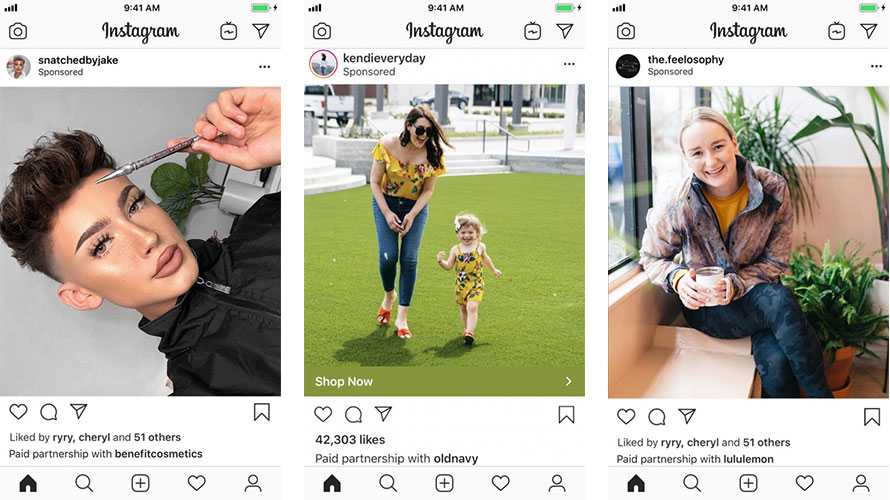 An account for cross-promotion or mutual PR should already have an audience.
What we do next:
An example of a successful cross-promotion is a sportswear brand account launching a marathon of fast workouts with a fitness trainer.
Promotion on other platforms
If you are actively running another channel (Youtube, Yandex.Zen and others), invite the audience to subscribe to your Instagram.
Important! Users should understand why they need another account of yours. It is unlikely that subscribers are interested in watching the same content. Work with different formats and themes. nine0395
An example of such a promotion method from a blogger with a promoted Youtube channel with expert information. The girl offers to subscribe to her Instagram, where she shares her personal.
Instagram promotion on the blogger's Youtube channel
User Content
Works for brands and individuals who want to promote their account.
An option for a brand is to invite users to post a photo with their product and a special hashtag. Then the brand reposts these publications to its page. nine0003
For personal accounts, tag brands. Then there is a chance that the Instagram page will be reposted to the brand account. It turns out win-win - the user gets more coverage, and the brand gets more content.
Location
Adding locations to the account description and posts to Instagram promotion is an additional way. This is especially true for local businesses and events. Just put a location and wait for thousands of subscribers will not work.
Paid promotion methods
Targeted advertising
Instagram official advertising is an opportunity to reach an audience with specific interests. If the algorithms themselves decide who to show your Reels or post to, then in advertising you set the audience yourself. Instagram offers to advertise in the feed, stories and Reels.
Examples of targeted advertising on Instagram: in the feed and in stories
Advertising is set up on Instagram itself or through the Facebook advertising account (if the account is linked to the page). For advertising on Instagram, goals are available: visiting an account, a website and increasing engagement - more messages. The audience can be selected automatically or configured, but the criteria are limited. nine0003
Setting up an advertising campaign on Instagram
There are more opportunities to designate an audience in the Facebook advertising account.
Possible goals of an advertising campaign in the Facebook advertising account
The downside of advertising on the social network is an impressive list of restrictions that are constantly changing. For violation of the rules, advertising is stopped, and sometimes the account is blocked without explanation.
Advertising with influencers
Influence marketing remains trending in 2022 as the blogging market grows. Therefore, Instagram promotion through opinion leaders is still relevant. Advertising among bloggers, famous personalities and experts is more trustworthy and is perceived as a recommendation from a familiar person. Advertising options for influencers: native (does not look like advertising) or direct.
Advertising with bloggers
How not to promote on Instagram
If to the question: “How to promote an account on Instagram”, someone offers cheating and giveaways, then run. Gray methods of promotion will not only not be useful, but will also destroy your account. Read about them and forget. nine0003
Giveaway
Giveaways are influencer contests in which you need to subscribe to the page and to all giveaway sponsors in order to participate in the prize draw. Subscription is a prerequisite for the draw. This is how sponsors gain a new audience, but after the draw:
Even during a giveaway, the gathered audience is ballast. Prize users are not involved in the content. For Instagram algorithms, this is a sign of irrelevant content.
Cheat bots and comments
Instead of live subscribers, you get fake accounts - bots that create the appearance, but in fact "drown" the account. For algorithms, the more subscribers, the more engagement should be. If the subscribers are bots, there is no activity from them. Instagram sees an uninteresting account and does not show it not only in recommendations, but also to subscribers. The social network also fights against bots and suspicious activity, bans accounts that are engaged in cheating. nine0003
Activity chats
They create the illusion of involvement, show social networks and other subscribers interest in the account. These are groups where users gather who like, comment on posts and watch each other's stories. The main disadvantage of the method is an irrelevant audience. If this method is still possible in an account from scratch, then after growth it will most likely harm - you will not see real involvement and interest in the content, so you will not understand how to improve it.
The essence of the methods is subscribing to multiple accounts that can be the target audience or/and likes to posts by different people. The goal is to draw attention to your account: the user will replace your activity and subscribe in response. But the methods are no longer relevant: users do not respond, but Instagram punishes for such promotion.