Home » Misc » How to save pictures from viber on android
How to save pictures from viber on android
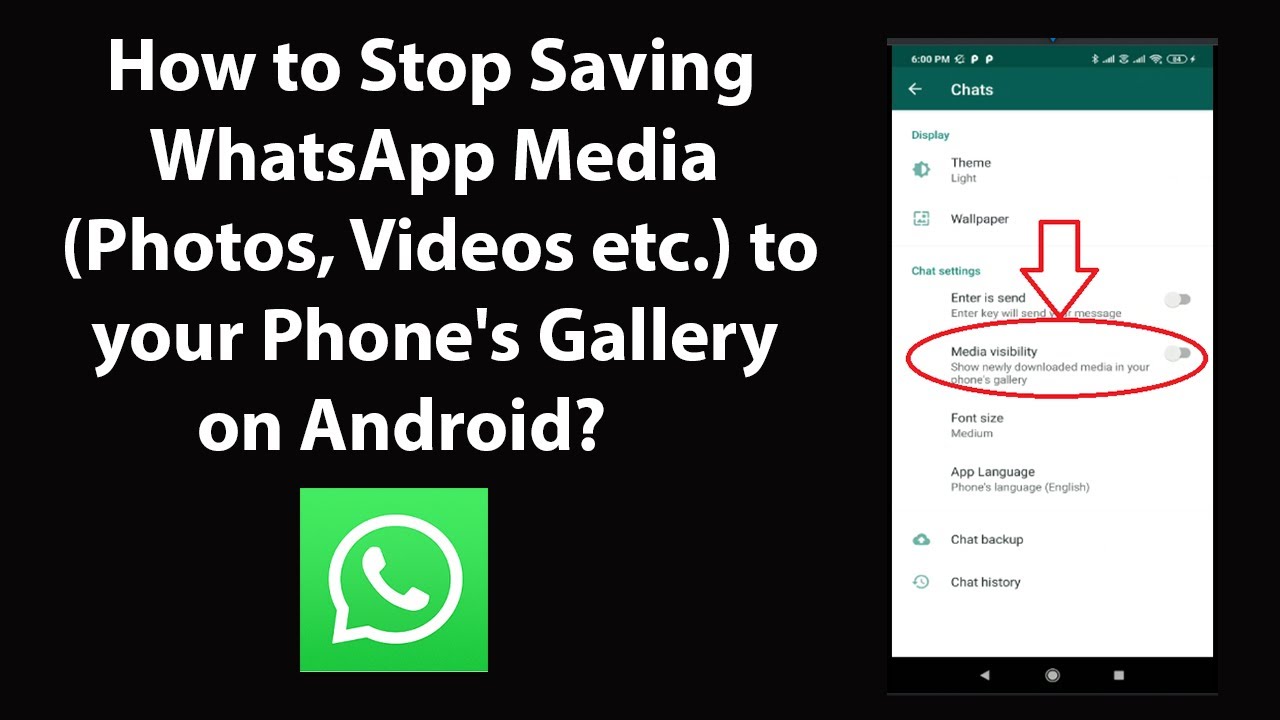
How to Save Viber Photos to Camera Roll
Aside from the regular messaging feature, Viber allows users to share photos to their contacts and groups. If you want to know how to save Viber photos to Camera Roll, then this article is for you.
It’s not unusual to see images on your chat history on Viber app as this feature adds a great experience to communicate to your loved ones. This is also one of the many reasons why people use the app frequently. To some people, sending and receiving photos through Viber is fast, easy, and convenient. What most users do not know yet is that you can save and share those photos outside the Viber app. Yes, you’ve read it right. You can absolutely get the pictures that you’ve received on Viber, save them to your photo gallery, and post them on other social media platforms.
How to Save Viber Photos to Camera Roll
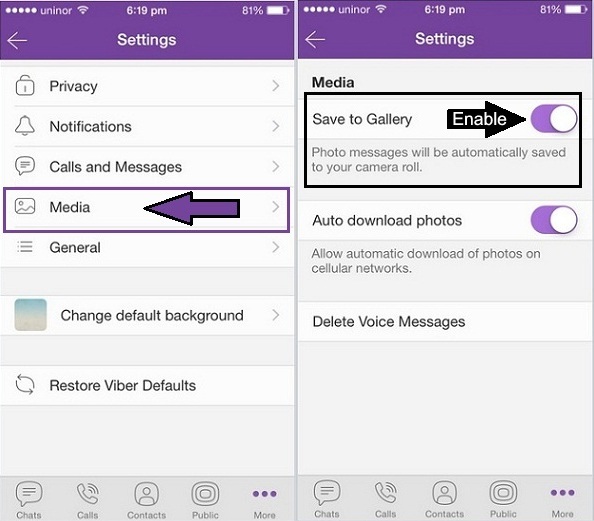
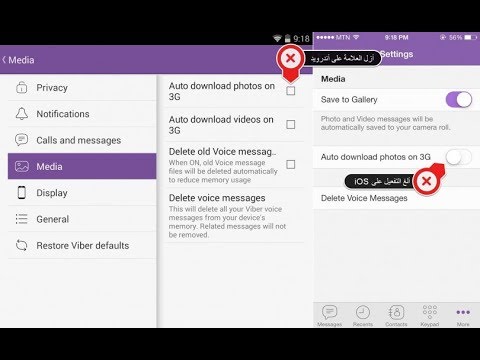
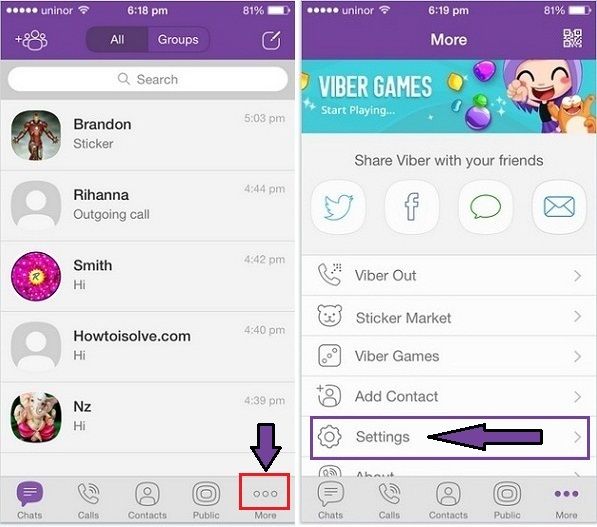
Follow the steps below to automatically save received Viber photos to Camera Roll: 1. Open your Viber app. 2. Tap the three dots at the bottom right corner of your screen. It’s the More icon. 3. Choose the cogwheel button or the Settings tab. 4. Look for the Media option. Tap it to go to the next menu. 5. The settings regarding all your Media files will be found here. Whether for your photos, voice messages, and other media content. At the upper part, you will see the Save to Gallery tab. Swipe right the button or just tap it to enable the said option. The button should turn into color purple indicating that the feature is activated.
If you’re in a group chat that sends photos regularly, your phone storage might get in trouble. The best option is to sort and save photos manually. All you have to do is open the image. Then tap the share button. If you’re not familiar with this button, it’s the square icon with arrow up. After that, a pop-up window will appear. Choose the Save to Gallery tab. And that’s it.
Frequently Asked Questions
Q: Will this method only save images? How about those video messages? A: Even though it says only photo messages, videos are also included. If you’re not connected to a Wifi connection, it might take a lot of your data allocation. Consider manually saving your photos and videos.
Q: Does it carry the same image quality of the photo? A: You may send and receive images on Viber up to 250 KB. It’s being compressed for easy downloading and saving. But, you can still view the picture as clearly as it should. If you’re in a data mode and having an issue about the downloading of the photo, check your settings. Be sure to disable the Restrict Data Usage menu.
Q: Will the pictures that have been saved to my camera roll stay in my chat history? A: The Viber app keeps downloaded media files in your conversation. Even if the photos or videos had been already saved to your camera roll or photo gallery. Unless you’re subscribed to delete your media files through the Keep Media option. Which will automatically remove files older the time you set.
Q: Why it’s not working on my phone? What’s the problem? A: The problem might come in many different aspects. First, make sure you’re using the latest Viber application. You can easily update your app in your Google app store or App store for IOS. Second, enable the Auto download photos if you’re using your cellular data. Next, check your storage. You might not have enough space to download those photos. And lastly, your app might be infected by a bug. This can break or damage a photo.You may try to delete and reinstall the app.
If you plan to save your photos using the manual process, make sure to turn off the Save to Gallery options as it will keep downloading and saving your received photos to your Camera Roll. To make the most of this feature, it’s recommended to use a wireless connection because media files like photos and videos consume huge data amount.
You just learned how to save Viber photos to Camera Roll. If you have questions about any of the steps above, let us know in the comments.
how to save pictures from viber on android?
AnswerThere are a few ways to save pictures from Viber on Android.
One way is to open the picture in the Viber app and then press and hold the picture until a menu pops up.
From there, select “Save Image.” Another way is to open the Viber chat in which the picture is located and then long press on the picture until a menu pops up. Select “Save Image” from there as well.
how to save pictures from viber on android?
How To Download Video/Photo From Viber Messages 2020
Where are Viber pictures stored?
Viber pictures are stored on the user’s device.
How do you save pictures on Android Gallery?
To save a picture on the Android Gallery, open the Gallery and find the picture you want to save. Tap the Menu button and select Save. Choose a location on your device to save the picture.
How do I get my photos to show up in my gallery?
Open the Photos app and find the photo you want to add to your gallery. Tap the Share button and then select Add to Gallery.
Why are my pictures not saving in my gallery?
There are a few possible reasons why your pictures aren’t saving in your gallery. One possibility is that your phone’s storage is full and therefore can’t save any more pictures. Another possibility is that you have set your phone to automatically delete old pictures after a certain amount of time, and the pictures you’re trying to save are older than that time limit. Finally, it’s also possible that there’s a problem with your phone’s software that’s preventing it from saving pictures.
Why won’t my pictures show up in my gallery?
There are a few things that could be causing this issue. If you have recently updated your phone’s software, it’s possible that the new software is not compatible with the gallery app. Another possibility is that there is something wrong with the gallery app itself. Finally, if you have a lot of pictures on your phone, it’s possible that the gallery app is simply struggling to keep up with the load.
Where do downloaded pictures go on Android?
On Android, downloaded pictures go into the Downloads folder. You can access this folder by going to the Files app and then selecting the Downloads folder.
Where are gallery photos stored on Android?
Gallery photos are stored in the Photos/DCIM/ folder on Android.
How do you save pictures on a Samsung?
On a Samsung Galaxy device, you can save pictures by pressing and holding on the picture until a menu pops up. From there, you can select either “save” or “save as.
How can I get my pictures from Viber?
To get your pictures from Viber, you need to first open the app and then select the contact you want to view the pictures for. Once you have opened the contact, you will see a tab that says “Media.” Click on this tab and then select the picture you want to view.
How do I backup my Viber photos?
To backup your Viber photos, you can export them to your phone’s camera roll. To do this, open the Viber app and tap on the three lines in the top left corner. Then tap on “Settings” and scroll down to “Exports.” Tap on “Photos” and then toggle on “Export to Camera Roll.
How can I retrieve my Viber pictures?
If you have deleted your Viber pictures from your phone, then they are gone for good. However, if you have backed them up to your computer, then you can retrieve them by following these steps: Connect your phone to your computer using a USB cable. Open the folder on your computer where your Viber pictures are stored. Copy the pictures to your computer’s hard drive. Disconnect your phone from the computer.
How do I save photos from Viber to my Iphone?
To save photos from Viber to your iPhone, you first need to make sure that you have the Viber app installed on your iPhone. Once you have the Viber app installed, open the Viber app and find the photo that you want to save. Tap and hold on the photo until a menu pops up. Tap “Save Image.” The photo will be saved to your iPhone’s Photos app.
How do I change my storage location on Viber?
To change your storage location on Viber, open the app and tap on the three lines in the top left corner of the main screen. Scroll down and tap on “Settings,” then scroll down again and tap on “Storage.” Tap on “Change Location” and select the new location you want to use.
How do I forward Viber to messenger?
To forward Viber messages to Messenger, you need to first install the Viber app and Messenger app on your phone. Once both apps are installed, open the Viber app and find the conversation you want to forward. Tap and hold on the conversation, then select Forward Messages. Select Messenger as the destination, then tap Send.
Does Viber backup save photos?
Yes, Viber backup saves photos. However, it’s worth noting that Viber only backs up messages and contacts if you have a paid account. If you don’t have a paid account, Viber will still back up your chat history, but not your photos.
How to save a photo from Viber to Android
How to save a photo from Viber to the phone gallery or to a computer? We will tell! Below you will find detailed instructions on how to autosave or manually upload images on a computer and different smartphone operating systems. It's just a crime to ignore cool pictures, isn't it?
Similarly, you can transfer photos from Viber to the computer one by one:
On the phone
You can disable saving photos in Viber on Android or iPhone by analogy.
Finally, let's see how to disable saving photos in Viber on a computer! According to the instructions above, uncheck the box "Startup". Done, now the pictures will remain in the chat.
You can also set up automatic download of any images from users:
Start Viber on your phone and go to the menu « More ". The section is located in the lower right corner and is marked with three dashes. The appearance of the application on Android and iOS is almost the same, so the steps will be the same.
Next, you need to go to the section " Settings ".
Select " Multimedia ".
In this section, the user must define whether files will always be downloaded automatically or only if the smartphone is connected to Wi-Fi.
It happens that the messenger just freezes. This usually happens due to the fact that many applications are open at the same time on the smartphone. The problem is solved by completely disabling all applications. In extreme cases, you should restart your smartphone.
Method 1: Automatic save
You can check only one option or both. You do not need to save settings. If the user turns on automatic photo upload, then the question of how to save a photo from Viber will completely disappear. Photos are downloaded to the gallery immediately after they are viewed in the correspondence. nine0003
Users set a contact photo in Viber in order to identify themselves as a person in this way. The avatar for Viber is visible to all friends from the list and can be seen in full size if you go to the user information section.
Conclusion
If the automatic saving of photos in Viber does not work, check the settings:
Open the chat in which the images were received.
Right-click on the photo. nine0026
Click on the line "Show in folder".
A folder with all the saved pictures will open, they can be viewed, copied or cut.
Please note. The setting does not work on some mobile devices. In this case, check the permissions for the application to access the device's memory. If this does not help, you will have to save the photo from Viber to your mobile phone yourself.
Activation of automatic saving of photos in Viber
Go to the folder with saved pictures.
Open a messenger such as WhatsApp.
Tap on the chat, drag the file to the window with the correspondence.
The image will be sent instantly.
Downloading a photo in Viber to a mobile phone or tablet is not difficult. You can view the copied photos through the gallery. Consider how to download photos from Viber to your phone manually:
You do not need to restart Viber. Now the application will save all received pictures in the Viber section. nine0003
No confirmation required. The file will be saved to the gallery in the Viber section. To find the file, go to the gallery and open the Viber album.
How to do this is described in detail in the next chapter.
To prevent the system disk from becoming full over time, autoloading of multimedia in the Viber version for the computer must be disabled manually. And here you can also set the parameters for how long to store files on the device.
Manual download
Step-by-step instructions on how to save photos from Viber to your computer:
By default, when installing Viber on a smartphone, the application has optimal settings and auto-upload of photos via WiFi is enabled. That is, you just need to open the image for viewing and it is automatically loaded into the gallery. Folders viber/media/Viber Images for photos and pictures and /Viber Videos for videos are created in the system.
The principle of saving photos and videos on a PC in the desktop version of Viber is slightly different. When installing Viber on a computer, the ViberDownloads folder is created on the system drive. All media content is automatically downloaded to this folder. It is located at - C:UsersUSERNAMEDocumentsViberDownloads .
The photo opens in full size. Click on the "Save" button.
Select the three horizontal lines that are at the bottom right of the screen.
Select Data and Media.
Auto save function
Click on the Share icon at the top of the screen.
Tap on the photo. nine0003
We see a notification that the file has been saved with an indication of its location.
Viber has been more than just a text messaging app for quite some time now, it's also been used to send documents, photos and videos. If this is your first time using this messenger, then you may have a question, how to save a photo from viber? We will talk further about how to do this manually or set up automatic saving using the example of Android and iOS phones. nine0003
First method : This option can be enabled in the messenger settings at any time. To do this, go to "Settings" (in the English version - Settings) from the menu "More" (More / three horizontal stripes or dots). In the settings you need to select "Save to Gallery" (Save to Gallery). Having done this simple path once, you will ensure that the photo is regularly saved automatically to your smartphone.
Interesting to read: How to change the language from English to Russian, read here! nine0003
The third method works for all versions of the application after Viber 5. 6: the process of saving photos has been simplified in them. If you are a user of one of the new versions, you can select a photo or video clip and click the Save button. All photos are automatically stored in folders on your phones. Folder viber / media / Viber Images if the video is / Viber Videos .
The second method is convenient for one-time, not permanent downloading of photos. It works like this: select a photo or video in the chat by clicking on it. After that, click the file upload icon (a rectangle with an up arrow). Then click "Save to Gallery". This way of saving files from Viber will allow you to control the memory usage of your smartphone. nine0049 Important : This method does not work on all versions of Viber.
The developers of the application have thought of several options for saving photos from a chat to your phone. You just have to familiarize yourself with them and choose the most suitable for a particular situation. The first method is to automatically save files to the gallery.
Choose the contact photo you need and then just hold your finger on it for a few seconds. When the photo is highlighted, a toolbar will appear on the screen where you need to click on the list of available functions (vertical three dots). In the options presented, select "Copy", and then the folder in which you want to save the photo. The best option is a folder on the memory card "DCIM". nine0003
The most important thing is that when exchanging photos and other files through Viber, the original quality is not lost.
If you have been sent a photo, you can set the save function on the Android OS in two modes: save only the objects you select manually or save all sent files to the smartphone's gallery.
Automatic saving
Despite the fact that the main function of the application is free calls and sending messages, all users can also exchange files of various formats. These files include:0003
Now let's look at some of the difficulties that you may encounter when setting up Viber and saving a photo:
It can be replaced by another option "Auto download over Wi-Fi" and "Auto download over GSM network". Activate these two items. It all depends on the installed version of the program on the phone, but you can still determine the meaning of the option by the name.
Saved photos can be edited, sent to other users or modified using additional programs. nine0003
iPhone users have several options. For example, set the settings at which media files will immediately fall into the Camera Roll. To do this:
The messenger provides for sending and receiving media files. Some of them may be important for the user, and he wants to keep them not only in the application, but also on the mobile device. In such a situation, the question arises of how to save a photo from Viber to your phone. You can do it, and it doesn't take much time. nine0003
In the messenger, click the tab "More" .
Go to the Viber section "Settings" .
Activate the slider next to the option to save photos to the gallery.
Auto Save to Gallery
Another way is to manually save the file. In this case, only the specified photo will remain on the smartphone, the rest will continue to be stored only in Viber. To manually save an image, click on it. Next, select the icon to send, and in the menu that opens, click the "Save to Gallery" command. It is important to note that animated pictures will not be automatically copied to the Camera Roll, even if this option is set by default. nine0003
To prevent loss, follow these steps:
Important to know! A more recent version of Viber (from 5.6 and higher) allows the user to independently choose the path for saving media files. To do this, a file is selected in the ribbon, and the "Save" button is pressed in the menu that appears. Next, the system prompts you to assign a storage location.
Viber installed on a computer allows you to download photos that are saved in a preinstalled folder called "Viber Downloads", "Viber Photos". How to find the path to this folder:
For Android devices
Where are photos and videos stored? When installing the messenger, separate folders Viber Images and Viber Videos are created in the gallery by default. The data from the tapes is stored there. But as soon as the user deletes a particular photo in the feed, it will also disappear from the gallery. Therefore, it is important to know how and where you can move data so that it is not lost.
Note! In exactly the same way, it is possible to build on the placement of pictures and videos in smartphones with the Android OS. Only the name of the gallery and its cataloging will differ. nine0003
Method 2.
It is quite possible to leave pleasant memories in the form of photos and videos from Viber. It is not necessary to store everything in the correspondence feed, because you can download media files to the device's memory. How to save photos from Viber to your phone? The process will depend on:
Download the new version of Viber After you take the desired picture, the photo will be sent to the interlocutor. If you wish, you can send a photo that was taken a long time ago. In this situation, you need to use the gallery. As you can see, the process pleases with its simplicity. nine0003
Now it's time to understand how to send photos and videos to your interlocutors. In fact, this option pleases with its lightness , because you can successfully learn how to cope with this task.
How to save a photo from Viber
How to save a photo from Viber - one part, how to send - the second part
First of all, if the program is not able to open a photo from a chat, you need to check the Internet connection. In most cases, poor internet connection prevents the download. If you want to re-look at a photo that has not been uploaded, you must find the desired message in the message history, and then click on it once. nine0003
Only if you have decent knowledge, using Viber will be able to reveal all its features and advantages to you. So, what should you expect?
The picture will open in full size. According to this scheme, you can see the photo set in the profile. Among the advantages, it should be noted the quick sending of pictures via Viber, since a person does not have to give confirmation upon receipt.
First of all, you need to start a dialogue with the person you are interested in. After that, you need to click on the plus icon, which is located at the bottom of the dialog. Immediately after that, a menu will appear in which you can see two columns that are responsible for the sent photos. nine0237 Now you can click on "Take photo" and go to the camera.
Continence
Share with friends:
Twit
Share
share
Send
Adblock Detector
How to save photos from Vaiber to the phone number 9000
Author Alexander Boydakov Reading 4 min Views 31.2k. Posted by Updated
Viber is a great communication tool. With it, you can save information about your life, work, leave evidence of negotiations, important moments in business, correspondence with loved ones. The choice of storage option depends on the type of information. How to save photos from viber to gallery? Understanding this is not always easy, and therefore on the road. Like real navigators, we will guide you through the labyrinth of viber features.
Article plan:
How to save a photo from viber to a gallery or memory card
How to save a viber video to a phone or computer
How to save a viber chat history to a computer or phone card
Saving a viber group when reinstalling
How to save a viber contact to a PC or card memory
Saving voice messages and music
Conclusions
Video review
How to save a photo from a viber to a gallery or memory card
In the messenger settings there is an option to autosave received photos. When selected, her photos will be automatically saved in the gallery. You can see photos, pictures as soon as you enter the viewer.
There is a "save as" option in the PC version of the messenger.
You can use it as follows:
open the received photo;
click on the right mouse button;
select "save as";
save the file to a memory card or any other media.
Saving video in viber to phone or computer
The possibility of automatic saving also exists for videos. You can configure the function by going to the settings in the "media data".
To view saved files:
on your phone, go to the gallery. This is where the "viber videos" folder is created;
On a computer, videos can be found in the "videodownloads" folder.
On a PC, the user has the ability to set the file saving address himself.
How to save the history of viber correspondence on a computer or phone card
Viber allows you to leave not only media files, but also regular correspondence. One way is to take a screenshot of your phone or computer. On a smartphone, it will automatically be saved in the gallery. On a PC, the resulting image can be opened with any graphic editor, select the location where it will be stored. nine0003
However, there are more convenient ways:
when using an android phone, backup on google play is configured. After saving, the history file can be opened on any device and, if necessary, re-saved on the phone card, sent to your computer. On iPhones, iPads, dialogs are saved on iCloud. The backup option is not available on PC;
select the desired messages on your mobile phone, select the "share" function and the method - via google drive, e-mail, bluetooth. Save the resulting files where necessary; nine0026
on a computer with windows, find the appdata folder, in it - roaming, viberpc and, finally, the folder in the name of which your phone number is present. Save it in a convenient place.
These methods allow you to leave only text messages in memory, media files will be lost.
Saving the viber group when reinstalling
The situation is different with saving groups, public chats after reinstalling the viber, installing its updates, changing the smartphone. nine0003
Your profile in general chats, correspondence will be saved automatically. Immediately after the messenger is reinstalled, you can resume using the possibilities of group dialogues in full.
How to save a viber contact on a PC or a memory card
All phone numbers, usernames from your contact list in viber are automatically saved in the phone's memory.
The messenger allows you to add new ones:
on your mobile device go to calls; nine0026
click on the plus sign;
Manually enter the user's phone number or scan their QR code.
Harder with PC contacts. It is impossible to save them here. All data must initially be entered on the phone. Only after that they will automatically be synchronized with the PC.

 Which will automatically remove files older the time you set.
 If you have questions about any of the steps above, let us know in the comments.
 One possibility is that your phone’s storage is full and therefore can’t save any more pictures. Another possibility is that you have set your phone to automatically delete old pictures after a certain amount of time, and the pictures you’re trying to save are older than that time limit. Finally, it’s also possible that there’s a problem with your phone’s software that’s preventing it from saving pictures.
 You can access this folder by going to the Files app and then selecting the Downloads folder.
 To do this, open the Viber app and tap on the three lines in the top left corner. Then tap on “Settings” and scroll down to “Exports.” Tap on “Photos” and then toggle on “Export to Camera Roll.
 Tap and hold on the photo until a menu pops up. Tap “Save Image.” The photo will be saved to your iPhone’s Photos app.
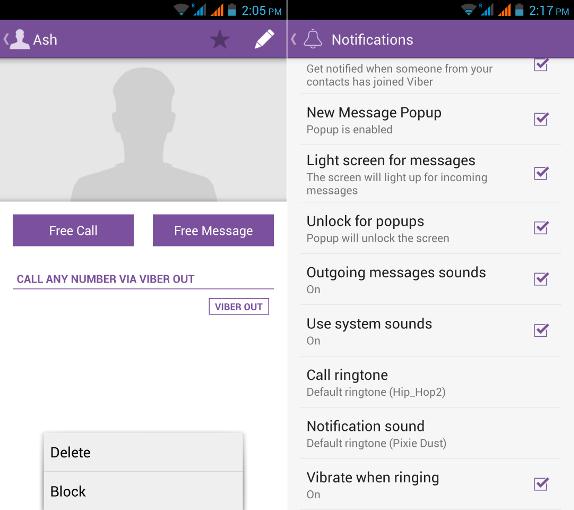 However, it’s worth noting that Viber only backs up messages and contacts if you have a paid account. If you don’t have a paid account, Viber will still back up your chat history, but not your photos.
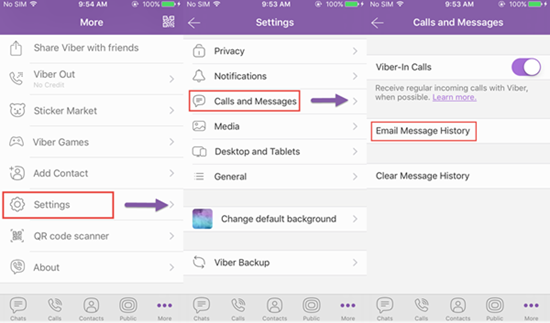
 The section is located in the lower right corner and is marked with three dashes. The appearance of the application on Android and iOS is almost the same, so the steps will be the same.
  nine0003
 That is, you just need to open the image for viewing and it is automatically loaded into the gallery. Folders viber/media/Viber Images for photos and pictures and /Viber Videos for videos are created in the system.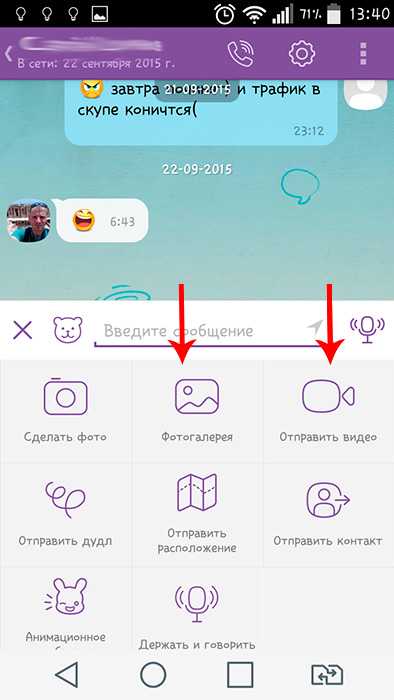
 6: the process of saving photos has been simplified in them. If you are a user of one of the new versions, you can select a photo or video clip and click the Save button. All photos are automatically stored in folders on your phones. Folder viber / media / Viber Images if the video is / Viber Videos .
  The first method is to automatically save files to the gallery.
  These files include:0003
  nine0003
  Next, the system prompts you to assign a storage location.
  It is not necessary to store everything in the correspondence feed, because you can download media files to the device's memory. How to save photos from Viber to your phone? The process will depend on:
  In most cases, poor internet connection prevents the download. If you want to re-look at a photo that has not been uploaded, you must find the desired message in the message history, and then click on it once. nine0003
 When selected, her photos will be automatically saved in the gallery. You can see photos, pictures as soon as you enter the viewer.
  One way is to take a screenshot of your phone or computer. On a smartphone, it will automatically be saved in the gallery. On a PC, the resulting image can be opened with any graphic editor, select the location where it will be stored. nine0003