Sponsored Post
Almost everyone posts on the Instagram app to gain more publicity, to be discovered by more people, and to enlarge their social network unless you’re catering to some close friends only. View IG is something important when you want to be discovered. One of the best ways to grow your account’s popularity and also your posts’ is for other users to share your posts.
In this guide, we’ll show you how to see who shared your Instagram post, your story reshares, and post insights with some extra tips.
Keeping up with InstagramInstagram is one of the most popular social media platforms, now run under the larger company Meta along with other platforms like Facebook. Many Instagram stories, posts, and reels are shared every second on the platform. To use it for your better management, it is essential to keep up with the ever-changing Instagram algorithm.
Instagram has been an ideal platform for making friends, building and promoting a brand by business account, pr share, and making money, especially after 2016 and it doesn’t seem to be ever slowing down in the close future. It is a platform that everyone uses, and there are lots of third-party apps that provide useful services to it such as 1394ta.
This article is about shared posts and posts insights and it is mainly for Instagram. To see which social media metrics are the most important in general and on which you should focus.
What you need to see in your shared Instagram postsYou can’t see who shared your post on a personal account, unfortunately. Regular users who use an Instagram personal account can see who likes their posts and who views their stories but to see who shared your Instagram post you need to change your account type.
There are two main ways of sharing posts on Instagram: stories share and share on DMs. To see the total number of people who shared your posts on Instagram, you need to change your account into a business account or creator account. Note that this is the only way you can see the total number of shares on your photo or video.
Due to privacy policy, you can’t see who shared posts with whom, but the business Instagram only needs to see the general traffic, and the details aren’t much more important anyway.
To view story reshares, DM reshares, and total Instagram engagement numbers, users need to change their account type.
To change your account into a business Instagram page or creator’s account: go to your Instagram profile, go to settings, tap account, scroll down, and tap switch to a personal account. Now you’ll be able to view insights on all the posts and how much users shared your Instagram post. An important app to boost your insights is 1394ta where you can manage required followers, likes, and views from there.
A business profile has to be publicRemember that changing your account type will automatically make it no longer a private account if it were. A business account can’t be a private account. Yet, this is the only way to view story re-shares and DM shares of Instagram posts and private account users aren’t interested in these numbers anyway.
If you need some inspiration for an Instagram name for your new creator account.
Now that your account is ideal, you can see who has shared a post on Instagram; again this is only total numbers and not specific people.
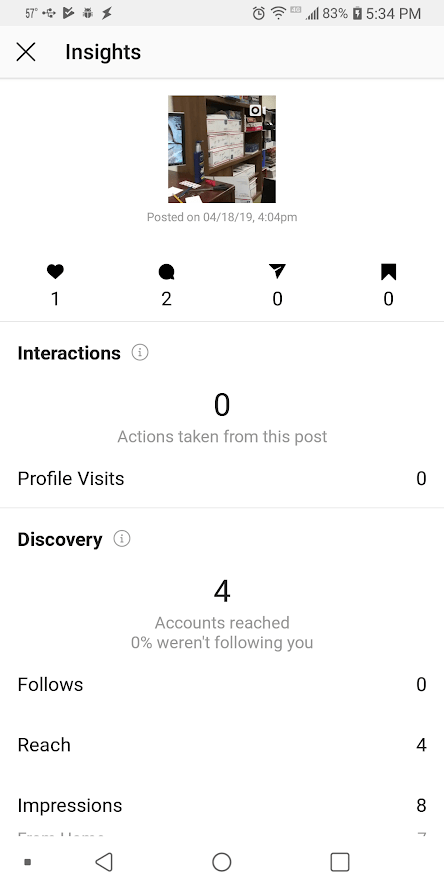
To view insights: open Instagram, go to your profile where you can see your Instagram photos, and select a specific post, “View insights” button will appear at the bottom left of the posted photo.
Here a new interface will appear with all Instagram sharing insights. The paper plane-like icon will show you the total number of shares. The procedure is the same in all the posts, the post can be a photo or a video, etc.
How to see who shared your post on their Instagram storyViewing post re-share on stories follows a similar path. You can also see the users who share pictures of yours on their stories. However, if someone’s account is private, you’ll not be able to see who they’re and that they posted it. If you post on your story other’s posts, they can see it this way too.
To see who shared your post on Instagram stories: go to your profile, open a post you have posted recently (older posts have a smaller chance of being shared on stories), click on three dots at the upper right-hand corner of the post, the button “View story re-shares” will show you if any single person shared your posts on their story in the past 24 hours.
You can only see within 24 hours
Again, after 24 hours, the posted stories disappear and you’ll not be able to see who shared your post and if they’re a private account, you won’t know. So, act accordingly.
By proceeding with this option, you’ll find an interface of people who shared your posts on the story in grid view. You can see their username, open the story and visit their profile and connect.
Using Instagram creative studio for more fameTo gain publicity in the advanced world of Instagram, you need a solid strategy. Almost no one gets famous because of their charming personality or looks. And business profiles don’t use Instagram the same way any other regular user uses it.
A feature called Instagram creative studio is essential for a business profile. This studio is accessible not only on mobile but on PC as well so you can get a better bird’s eye view of your business profile. To see everything, you need to know about the Instagram creative studio.
Here you can access various essentials on the main menu: content library for seeing all your content. A calendar features so you can schedule posting and not keep your followers waiting by establishing a routine. You can also schedule a post for a future date and it is posted when its time comes.
Monetization and better insightsThere is also here an “Insights” page but is much more effective than the one we’ve been talking about, which only enables seeing who shared your post. Here, you can explore your profile insights and audience metrics by their gender, age, location, and Instagram activity.
You can use the “Monetization” option to see how you can make money off your content and how much. If you need to grow bigger on Instagram, you’re going to need to use the Instagram creative studio at some point.
Some tips for going bigger on InstagramTo view your post shares, you need people who are interested in your content. Here are some tips on how to make better Instagram posts.
Make use of the search barInstagram has a top search engine connecting people and content. You need to make the best use of it so your content is discovered more and easier. Here there are Top, people, tags, location, and audio sections.
The top page is sorted according to captions. So, add relevant keywords to your captions, for people to find the posts. In the audio section, you can add popular music to your reels, so when people look up a certain song, your video appears.
Add hashtags and location tags to your postsRelevant hashtags are essential for a post to be visible on an interested user’s search. Make sure you use relevant hashtags for your niche.
Also, add location tags to your post so people who discover a certain location can see them.
Choose a charming username, name, bio, and pictureThink about your audience carefully and what they like. Choose your names and bio accordingly so people don’t go back on your profile and want to see more of your stuff.
Choose your profile picture according to what you post. A smile and promise of fun are always attractive to everyone.
Tech
Plus, why it matters.
by Siena Gagliano and Kaitlyn Wylde
Updated:
Originally Published:
Delmaine Donson/E+/Getty Images
You open Instagram to find you have a bazillion new followers and have no idea why. Did you just wake up famous? Are you making headlines somewhere? Or, perhaps more likely, did someone with a large following share one of your posts to their Instagram story and score you some new internet friends?
If you’re curious about your surprise fame or just how fire your followers actually think your Instagram posts are, there’s a hack that allows you to see who reshared your posts so you can keep tabs on who’s giving you free publicity. (Or just how proud your mother is of the latest portrait you posted of her granddog.) Whether you’re interested to know more about your engagement on Instagram, or just dying to know who finds your posts interesting, there’s a lot to learn from your post insights.
While anyone can reshare content by taking a screenshot of a post or story and uploading it to their stories from their camera roll, the original poster won’t be linked, notified, or credited. The only way to tell if a user reshared your post to their Instagram story is by using the in-app post sharing feature, which also gives viewers a chance to tap the original post and go to the poster’s page directly. It’s a more friendly and upfront way to share other users’ content than doing so without credit.
Here’s how to find out who has shared your posts to their stories — and why you should care.
The only way you can see who shared your Instagram post to their stories is if you have a business or creator account. These kinds of accounts give you access to content insights, which can tell you a lot about who is engaging with your Instagram posts, Reels, and stories. It’s free to convert your personal account to a creator version (and easy enough to switch back), but keep in mind that creator accounts can’t be private. Once you have your account in creator or business mode, follow the below steps to see who shared your posts to their Instagram stories.
1. Go to your profile and click on the post.
2. Click “View Insights” on your Instagram post. If your post was reshared, there will be a number directly underneath the paper airplane icon. This will tell you exactly how many people reshared your post.
3. Return to the photo and click on the three dots in the upper right-hand corner of the post. There will be an option to “View Story Reshares.” Click on it. (Note: This option will only appear if your post was reshared at least once.)
5. You will be brought to a page titled “Current Public Reshares” where you can see exactly how many people reshared your Instagram post to their stories.
6. To see who shared the post, click on a reshared story in the grid, and it will take you directly to the user’s story.
7. From there, you can see the username and click on the account.
Siena Gagliano
If engagement is important to you — think, if you’re trying to build your influencing empire — finding out who shared your Instagram post can be incredibly valuable information. By checking who reshares your posts, it can help you understand which demographic your post jives with. Is your new needlepoint hobby striking out with Gen Z? Are your social justice infographics getting circulation amongst respected Millennial peers?
Reshare insights are also helpful if you just recently got a slew of new followers or likes on a post, but don’t know why. You can check your posts individually to see which ones might have been reshared, and then go through the users listed to see if any of them have big followings that could account for the influx of notifications.
While your friends and followers might like a post enough to double tap it, sharing a post to your story is a bit more of a commitment. Users generally don’t share posts to their stories unless they really connect with it, so it’s good to know who is spreading the love.
This article was originally published on
How to find out who shares my posts on Instagram. Your favorite social network Instagram And so every day you post a lot of multimedia content, hoping to become a real influencer.
In this sense, you have recently noticed an increase in the number of subscribers after the publication of the publication: perhaps some people have shared it and you would like to know the names; Maybe some of them are famous.
Are you surprised how to find out who shares my posts on instagram ? In this case, I must first inform you that you can do this by following the instructions that I am going to give you in this guide.
However, keep in mind that Instagram doesn't let you know the names of people who shared a post, only the number of people who shared it.
Index
 2 How to use Instagram statistics
 before finding out who is divided by my posts , I must inform provide you with some information regarding this feature.
First of all, as already mentioned, you should know that you cannot find out the exact name of the people who share the publications that you have published on a well-known photographic social network.
But what you can find out is the number of people who share them by using the functionality of Instagram , called statistic , which shows how many times posts were posted in Feed.
However, for this you must switch to a professional Instagram account ( creator o SERVICES FOR LEGAL ENTITIES ). This operation is free and reversible at any time and can only be done through the app. Instagram To Android e iOS.
The benefits of this step plus the ability to access the Instagram statistics tool, which also allows you to get information about the progress of your account, also gives you the opportunity to promote your publications through payment.
The steps to switch to a professional account are very simple and require you to link your account if you wish. Instagram to Facebook page.
To get started, log into your Instagram account , for Android or iOS, go to your pe profile and hit the ☰ icon located in the upper right corner. Now in the menu that you are shown, click on item of configuration and click on article Account .
Then tap Switch to professional account and choose if you want to create an account creator (ideal for public figures, content producers, artists and influencers) or account LEGAL SERVICES (more suitable for retailers, local businesses, brands, organizers or service providers).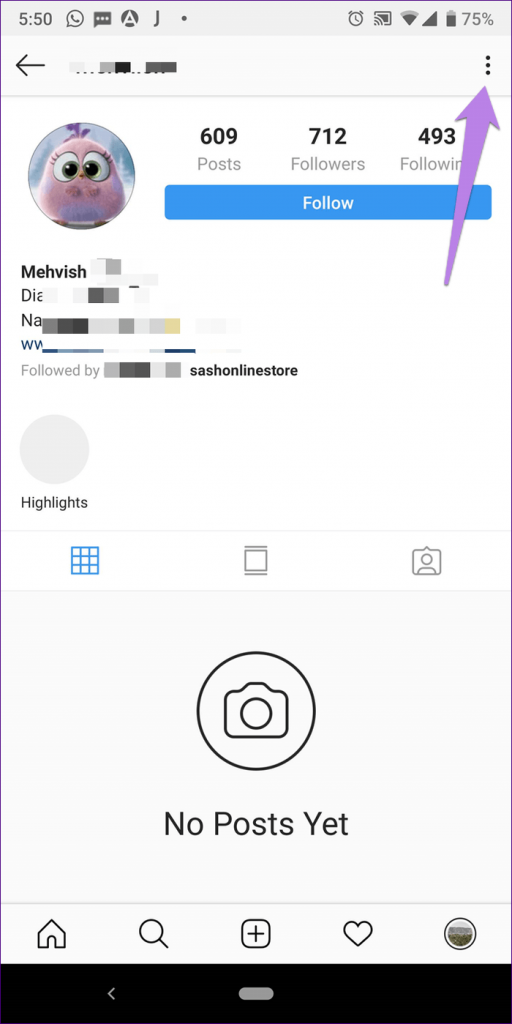
In both cases, to continue, press the button after o Verify enter all the required information, for example How to contact us , for your profile and category which represents you the most (e.g. Video Maker ).
Also optionally connect your facebook page to complete the operation.
After that, you can access the tool statistics for your Instagram account and by following the instructions that I am going to give you in the following lines, find out the number of people who share the publications that you publish.
Now that I've given you all the background information, you need more information about who shares the posts you post. Instagram Let's see in detail how to do this through the social network application for Android and iOS.
With that said, to get started, sign in to your account (if you haven't already), click on your profile icon, and find a post that interests you. Then click on it and click on item View statistics .
Now in the new screen that appears, consult the number indicated in accordance with aircraft symbol , which shows the number of people who shared the publication you published by sending it as a private message to other users of the social network.
As already mentioned, unfortunately it is not possible to know the names of people who have shared content, only the number of those who have shared it. You can only repeat this for published posts after switching to a professional Instagram account.
You can also:
How to unblock iPhone telegram channels
How to get music back on Instagram
How to activate NFC on iPhone
How a heart is made with a mobile phone keyboard
How to remove watermark from Tik Tok
How to activate NFC on iPhone
How to update Youtube
How to download minecraft for free on iPhone
How to know if someone is ignoring messages in Messenger
How to find out the IP address of a person
How to save Instagram stories with music
How to change Supercell ID email
How to delete blocked WhatsApp contact
How to see hidden WhatsApp profile photo
Menu
Content
Statistics is a section on Instagram that helps you monitor the activity of subscribers, including reposts. It can be viewed by users who have transferred a personal page to a business account.
If you want to know who shared your story, you will need to connect a business profile. To do this, go to the settings, and then to the "Account" section and select "Change account type".
After that, a section with Statistics will appear under the profile header. There you can see who liked and commented on posts, reach, as well as all reposts and saves.
You can't immediately get information about who shared the content - the data appears after viewing stories by at least 2 people.

If you want to share someone else's story on your Instagram stories, use the new feature on the social network for this. Here's what to do:
But this method only works if you are tagged in this story and the user has allowed sharing his Story.
Other ways to see who is sharing your content is by using dedicated apps. Popular smartphone apps are Analytics for Instagram, Instagram Followers, Unfollowers&Ghost Followers.
Applications are suitable for Android and work on iPhone. Some apps will require you to pay for a subscription to see who reposted my story.
It used to be easier to view information about post reposts - you had to tap on the three dots next to the post and select "History reposts".
Due to major changes to Instagram's policies and to Europe's privacy policy in particular, this feature has been removed from all account types. But information can still be found out, although not accurately.
This is only possible when switching to a professional account. Follow these steps on your business account to see the number of people who shared a post:
 Study the information.
 If a post is added to Instagram story and you are tagged, you will receive a notification about it. And this is an additional way to find out who interacted with your content.
If you want to add another Instagram user's post to your stories, use these instructions:
If you want to share a live stream or IGTV, open the post in the IGTV section and also tap on the plane after you open the material. Instagram live can be shared if the author saved it in this section.