Telegram channels are intuitive tools for broadcasting messages if an audience is willing to listen to what you have to say. You can create different types of channels as per your usage. Telegrams channels are primarily used for sharing information, discussing important topics, and as a PR or marketing branch among businesses.
If you own a channel and want to send your channel’s link to your friends or colleagues but are having trouble finding your channel’s link, we will guide you through how to copy and share the link in a few simple steps, followed by a guide to revoke the channel link and how to create, link, and unlink a group from your channel.
Two types of channels can be created in Telegram — public/private — and the methods to share a Telegram link of the channels is slightly different. Here we’ve covered the following topics.
Also read:How to create a Telegram group?
Launch your Telegram app and open the Telegram channel and follow the steps to share a public Telegram channel link.
Also raed: How to create a poll in Telegram?
Open the Telegram channel and follow the steps below.
You can also revoke your link anytime you want to make that link inaccessible.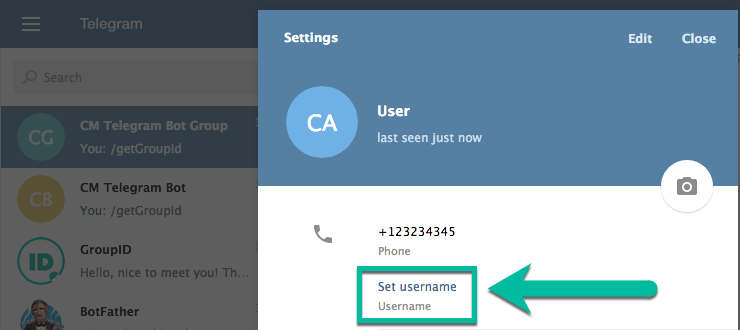 Tap on the Revoke link option just below the copy link option (refer to the third screenshot from the left in the image above). Then on the confirmation box, tap on the Revoke option.
Also read:How to pin or unpin a message on Telegram groups and channels?
Creating a group linked to a channel is the same for both the group types — public and private Telegram channels.
Open the channel and follow the steps below to create a group for that channel. You can use this group as a discussion board for the channel
Also read:How to join a Telegram Group or Channel?
Open the channel from your chat window and follow the steps to unlink the group.
Also read:Top 7 Telegram channels for cryptocurrency
Akash Singh
Akash is a law graduate who likes to go for bike rides on the weekends soul-searching for answers to his many existential questions.
You can contact him here: [email protected]
 We're an ad-supported publication. So, if you're running an Adblocker, we humbly request you to whitelist us. ?
 We may earn a commission if you buy something from a link on this page. Thanks for your support.
Kumar Hemant 7:15 pm IST | August 26, 2019
Yadullah Abidi 5:32 pm IST | July 22, 2022
Prayank 9:15 pm IST | October 16, 2018
Yadullah Abidi 10:30 pm IST | November 8, 2022
Monika Shukla 9:00 pm IST | July 5, 2020
Editorial Team 3:00 am IST | July 7, 2021
Yadullah Abidi 9:39 pm IST | August 17, 2022
Yadullah Abidi 2:00 pm IST | November 2, 2022
IANS 5:30 pm IST | November 8, 2018
More
by Dinesh Singh
As an Amazon Associate and affiliate of other programs, I earn from qualifying purchases.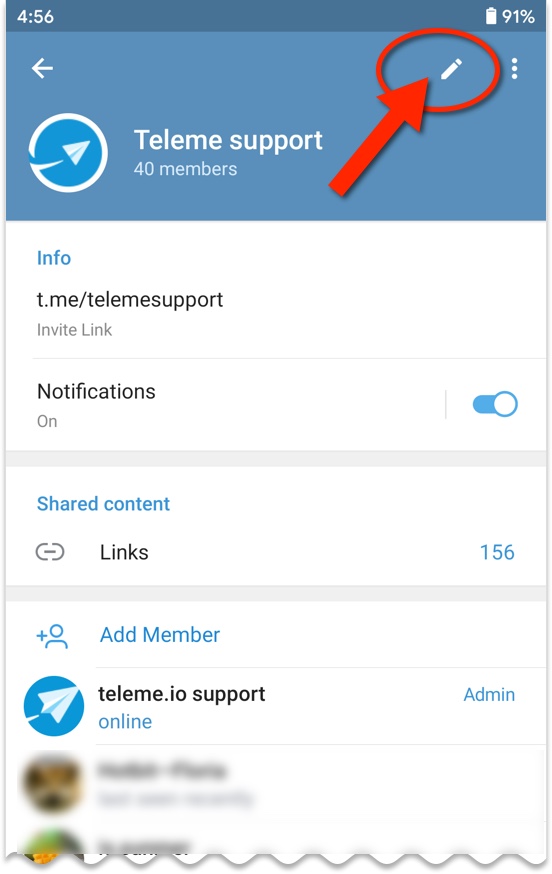
Telegram is one of the best social networking platforms for creating large groups. With the recent update, you can add as many as 200,000 people in a single group. Admin can constantly maintain the group chat history and also add admins with different rights. Telegram also has some unique features like editing the sent messages, pinned messages, hashtags, customization via bots, etc. Also, Telegram groups are better than WhatsApp or other apps’ groups as you can send large files up to 1.5 GB without many efforts.
You can either add the people in your Telegram group who are in your contact list or you can make people join the group using the Telegram group link.
Using the group invite link, you can also make people join the group that is not owned by you. So without wasting much time, let’s get started.
Also Read: Best Telegram Bots
Contents
 1 Give The Access
1. Open the Telegram group that you own and in which you want to add people. After opening the group, tap on its name at the top.
2. Now there you will see the list of the members currently in the group. Above that, select Add member option.
3. In the next step, tap on Invite to Group via Link at the top.
4. Now, the link to join your Telegram group will be visible to you. You can either copy the link by tapping on it or by tapping on the Copy Link option. You can also share the link directly without copying. Tap on Share Link and options will pop-up to share the link using various social networks and apps like WhatsApp, Twitter, Instagram Direct, Messenger, Gmail or via a text message and even on Telegram itself.
5. If instead of Share Link you tapped on Copy link, then you can send the link to your friends however you like and they will be able to join your group if they are active on Telegram.
If you see some unnecessary people joining your Telegram group and it really bothers you, then Telegram has a solution to your problem. Using the Revoke Link option you can disable the previously generated link that has been spread to other users and a new link for your group will be automatically generated by the Telegram. Now the people who have access to the old group link will not be able to join it using that link.
Well, it is really easy to get the Telegram link for groups that are not owned by you and quite similar to the above method. So here are the steps to get the links of groups for which you are not the owner.
1. Launch the Telegram app on your device and open the group for which you need the link.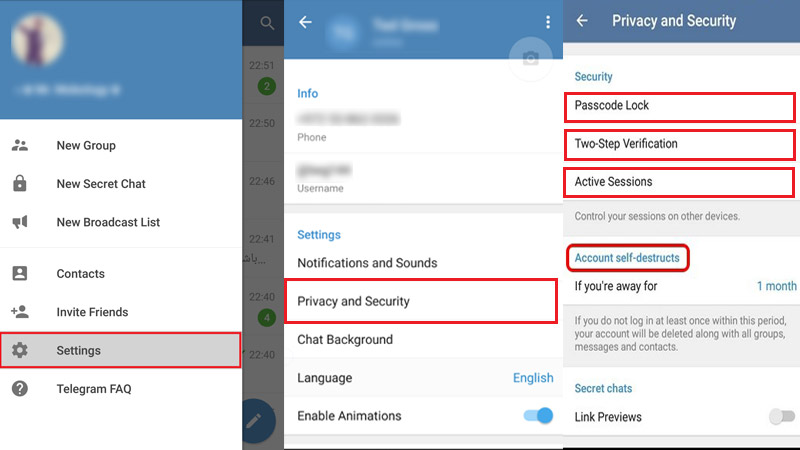
2. After that, tap on the name of the group provided at the top.
3. Now you can see the Invite link, just above the Notifications option. Long press the link to copy it or single tap to share it using the various social media.
This method will be applicable to any Telegram group. Similarly, you can make this method work for Telegram channels as well and share it with your dear once.
Also Read: 16 Best Telegram Channels To Join
So, we hope that now you know how to access the Telegram group links and use them to invite people. Telegram Groups are a great platform for sharing your views, queries, memes, art, or anything under the sun to a large audience. For sending large files directly from your computer, you can use Telegram on your PC or Mac too.
If you have any queries regarding Telegram Groups or other features, you can ask us in the comments.
Dinesh Singh
Hovering continuously over many social networks, he has recently landed on creating contents about them. He loves to trek, swim, cook, read and mostly eat and sleep.
In Telegram, each profile, group, channel and post is assigned its own link. From time to time there is a need to copy it, for example, to post it on social networks.
In the article we will tell you where to look for links in Telegram, how to copy them and share them with others.
Advertisement: 2VtzquY3wEz
Read also: 14 ways to promote your channel in Telegram
Why you need links : to forward an interesting post to a friend, share information on social networks, invite to your own or someone else's group, place a link on an external resource (for example, on a personal website or social networks) , download the file via a direct link, promote the profile.
Where are the links and how to copy them.
Important : there are 2 types of links in Telegram - clickable login @login and a link like https://t.me/username (or https://t.me/channelname). The first ones work only inside the messenger, with their help you can find a profile, group / channel or bot in the search for a TG. The latter are needed for external distribution (share on social networks, post on a website, send to a friend), although they are also used inside the TG. nine0003
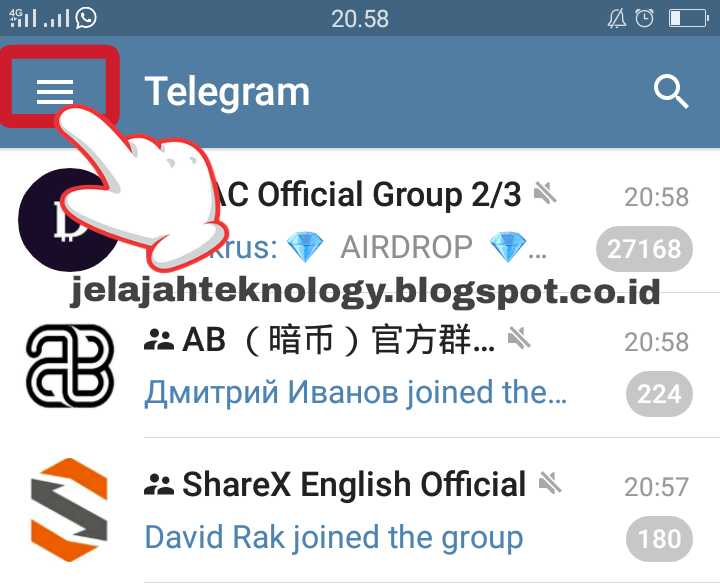
From the computer go to the menu (3 horizontal bars).
Next, click "Settings", then "Edit profile".
We go down to the "Username" section (login with a dog @) and click on edit (pencil icon). You may have set a username during registration, if not, you can create one now.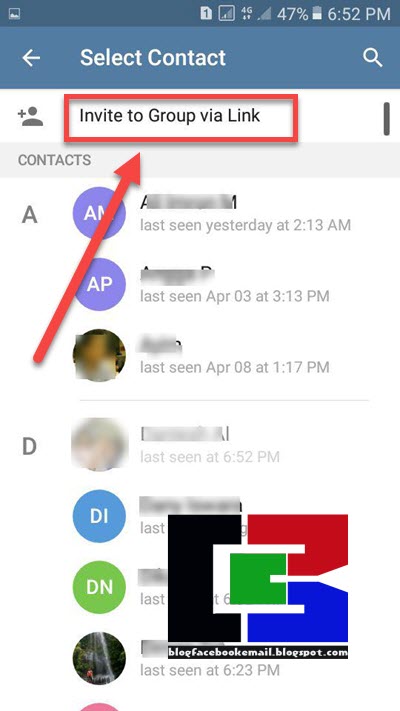 nine0003
This section contains your login with a dog, and below is a clickable link. According to the first one, they will find you in the Telegram search, and when you click on the link, a dialogue with you will automatically open.
From the phone the actions are similar, but with one difference: open the menu (3 horizontal bars). Then "Settings".
If we want to share the login, it is located immediately below the phone number.
If you need an additional clickable link, click on “Username” (there is no pencil icon for editing here). The link is at the very bottom, as in the desktop version. nine0003
Article in the topic : How to make a poll in Telegram
From PC we open a chat with the right person, on the right. If he specified "Username", then we will see a login with a dog.
If, in addition to the login, we also need a clickable link, then we need to add the username without the dog sign @ to the link https://t.me/.
Example :
Important : not all users specify a login. If there is no login, then you can provide the user's phone number (then they can find it in the TG by number) or click "Share contact" (the button is located below the login and phone number).
Next, select the recipient from the contact list with whom we will share the profile.
The Share feature is available only if the contact is added to the address book. It only works inside Telegram.
From the phone open a chat with the user, then click on his profile picture.
The profile information is displayed. If there is a username with a dog, save it. Similarly, to get a clickable link, just add a username after https://t.me/
If you want to share a contact, click on the 3 dots in the upper right corner. An additional menu opens, there we find “Share a contact”, then choose who to forward the contact to. nine0003
You can find it in the same way as the link to the profile - open the bot, on the right in the information panel we find the username. If you need a link, for example for an article, insert the username of the bot after https://t.me/.
P.S . We have prepared useful material about 10 Telegram bots for Instagram - we advise you to read it.
Here everything is done by analogy with the previous paragraphs, only instead of a username in the link there is a unique name of the group/channel/chat. nine0003
To copy a link to a group, channel or chat in Telegram from a computer, go to the group / channel / chat menu (the menu is on the right, as well as the user or bot information panel).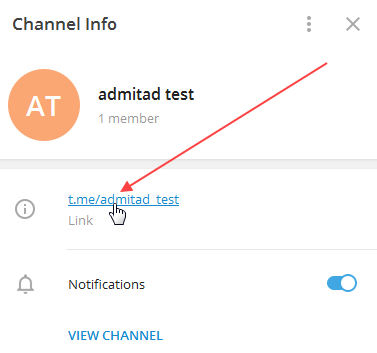 There should be a link at the top. Copy it and send it wherever you want.
It is clear from the link what the unique name of the channel is. For example, to find a Postium channel in the Telegram search, you need to take the word postiumru from the link t.me/postiumru and add @ in front of it, it turns out @postiumru.
From the phone open the group, click on the avatar. There will be a link below the description.
If the channel, chat or group is private, only admins can invite new members there using a special invitation link.
If you were invited through a secret link, then you can also distribute it - the link remains working until the admin replaces it with another one. nine0010
Where to get the invitation link is written below.
To find your link, go to the group/channel/chat management.
From the PC, open the channel, click on the 3 dots in the upper right corner opposite the name and select "Channel Management" in the drop-down menu.
Find the "Channel Type" section, click on it.
If the channel is private, there will be an invitation link at the bottom where you can invite new members. nine0003
The participants you invited may start spreading the link, so to prevent unnecessary people from getting into the channel or chat, it is recommended to reset the link - it will be replaced with a new one, and the old one will become inactive.
If the channel is public, anyone can find it in a search by a unique name or by clicking on a link. The admin must create a link, that is, come up with and enter a unique channel name after t.me/.
Important : the "Link" field cannot be left empty if you create a public group, otherwise the channel will be private .
From the phone open your channel or group, click on the avatar. Next, click on the edit icon - pencil.
Find the channel type, click on it.
If the channel is private, click Copy Link or Share Link. If you need to create a new one, click "Reset Link".
If the channel is public, create a permalink. nine0003
To copy a link to a Telegram post from a computer, find the post we want to share. At the end of each post there is an arrow in a circle, click on it.
Choose who you want to share with from contacts in the TG or click "copy link" if you only need a link.
You can also right-click on a post and click "Copy link to message" if you only want the link, or "Forward message" if you want to share the post with your contacts. nine0003
From the phone we find the arrow in the circle at the bottom of the post, click on it.
Select a contact from the list or click "Copy link".
In Telegram it is easy to find and copy the link to the profile, channels and bots - everything is done by analogy. If the profile has a username (@username), and the channel or group has a unique name @channelname, then just add the word after the dog sign to the https://t.me/ link. If the channel, group or chat is private, then only the admin can add participants there using a secret invitation link. nine0003
Useful links :
Comparison of online courses
Before you buy any course, compare conditions from different schools - tuition fees, discounts, duration, whether there is an employment program. Find an online course >>
Advertising
More articles on the topic:
Advertising
Advertising
 ME closed
 January 29, 2019 Web Services
A simple change of address will solve the problem. nine0003
External links to channels and profiles like t.me/lifehackerru have stopped working in Russia. When you try to follow a link without a VPN or proxy turned on, the "Could not access the site" page appears.
Addresses of a different type can solve this problem: t-do.ru or tlgg.ru . Any of them can simply replace the usual t.me in any link to Telegram. For example, t.me/lifehackerru will become t-do.ru/lifehackerru /. By clicking on it, you will be taken to a special page where you just have to press the blue button.
In order not to type the address manually every time, you can use quick link converters. They are available on the websites of the services t-do.ru and tlgg.ru.
Just copy the broken address from t.me there and press the blue button.
Both addresses work with all types of links in Telegram. So you can share profiles, chats and channels again. Recall how this is done. nine0003
To get a link to your profile, you need to go to the Telegram settings through the menu and select the "Edit profile" item. By clicking on the username, you will open an editing window with a ready link. By clicking, you can copy it to the clipboard. It remains only to insert t-do.ru/ or tlgg.ru/.
The standard link to someone else's profile looks identical: t.me/username . Accordingly, in order to share a link to a contact in Telegram now, you need to insert the username into the link of the format t-do.ru / username .
You can find out username by selecting the desired contact in the messenger and clicking on his name above the chat window. In the block that opens, after the @ symbol, the name will be indicated. Copy and add it after t-do.