Home How To Telegram Tips and Tricks: Delete messages by date, here's how
Want to delete messages on Telegram by date? You can do it by following three simple steps. Check the step-by-step guide here.
There are several social networking applications like Telegram, WhatsApp, among others using which you can stay connected with your friends and family. Using these applications you can not only chat with the person in your contact but can also share media files like images, audios, videos, and more. These messaging applications also provide you with the option of deleting messages. You may want to delete messages if you send it by mistake to someone else or there is a typo or wrong information has been sent or something else.
But what needs to be noted is that if you are a WhatsApp user you will only have about an hour after you have sent a message to request to Delete for Everyone. Telegram users can delete the message for both themselves and the receiver anytime. Also Read: Instagram to help find missing children; launches AMBER Alerts
If you want to delete a message or a set of messages sent on Telegram all you need to do is just select the message or messages you want to delete. Then click on the delete icon that will pop up at the right top corner. As you will click on the delete icon a message pops up asking "Are you sure you want to delete these messages? along with a check box asking if you want to delete the message or messages for the receiver as well.
You can click on the check box if you want to delete the message/messages for the receiver too and you are done. While if you want to delete Telegram messages by date, here is how you can do so. Also Read: iPhones can now control Android TV devices! Here is how you can do it
The feature to Delete Messages by Date got updated on the App on December 7, 2021. Telegram users have complete control over their digital footprint and can delete any messages from a conversation at any time. With the help of this feature Telegram users can clear chat history from a specific day or date range in any one-on-one chat.
It needs to be noted that clearing history by date currently only works in one-on-one chats, but messages in any chat can be set to auto-delete one day, week, or month after sending.
Step 1:
Open Telegram and go to the chat from where you want to delete the messages.
Step 2:
To open the calendar, tap the date bar that pops up as you scroll through the chat.
Step 3:
Now, you need to choose which days to clear.
Follow HT Tech for the latest tech news and reviews , also keep up with us on Twitter, Facebook, Google News, and Instagram. For our latest videos, subscribe to our YouTube channel.
First Published Date: 04 Jun, 15:21 IST
Tags: telegram apps guide
NEXT ARTICLE BEGINS
What is WhatsApp proxy? How to use it on Android Phones?
Have iPhone 14, iPhone 13 or iPhone 12? Send invisible messages, try it this way
Privacy matters! Hide WhatsApp messages with these tricks
How to use Windows 11 Search feature for lost files
Run two WhatsApp accounts on your Android smartphone; here is how
iPhone 14 Quick review: Worth it? Camera, Crash Detection to Gaming- You BETCHA!
Realme 10 Pro+ 5G Review: Packs curved display and is a little pricey.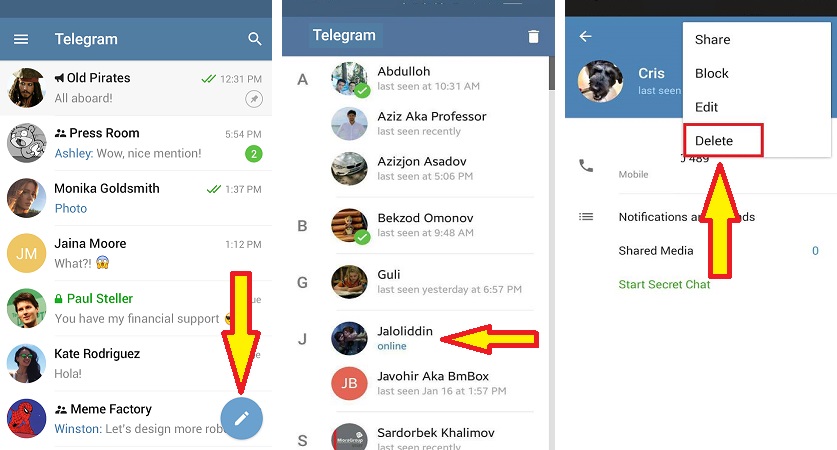 But is the phone worth it?
Lenovo Yoga 9 14IAP7 Review: As a convertible laptop, it breaks through all the negativity
Dynamic Island on iPhone 14 Pro gets more useful; Should all phones have it?
Lenovo Legion 5i Pro (2022) Review: ‘Stylish’ gaming laptop
Dell XPS 13 9315 2-in-1 review: Best convertible laptop to buy
Elon Musk’s Tesla hype machine breaks down
Explainer-Why U.S flights were grounded by a FAA system outage
Google denied interim relief in App Store case by Indian court
Motorola Edge 30 Fusion Viva Magenta Review: All about beauty and power
Microsoft Rolls Out Automatic Energy-Saving Mode for Select XBox Users
Free PlayStation Plus Games for January 2023: Star Wars Jedi, Fallout 76 and more
War-themed Arma 3 video game fuels wave of misinformation
First pre-trial hearing in Microsoft-Activision case set for Jan. 3
BGMI to make a comeback in 2023? Here’s what latest leak revealed
A good way to hide the evidence
Since Telegram offers more features than any other messaging app, message management on this platform can be a bit more complex. Such a mundane task like deleting your messages from a chat becomes more difficult if you also want your messages gone from Telegram’s servers.
We’ll show you all of the ways that you can delete messages on Telegram, whether it’s in a regular chat with your friend or colleague, or in a group chat with many users.
Table of Contents
If you’ve recently switched from a different messaging app to Telegram for security and privacy reasons, you first need to understand how Telegram stores your chat history, as well as how you can erase it.
You can have two different types of chats on Telegram: normal or cloud chats, and secret chats. Cloud chats are the chats between you and other users, group chats, and public channels. They’re stored in the cloud, which allows you to seamlessly use Telegram on different devices, since your chat history can be easily downloaded. According to Telegram, cloud chats are encrypted with encryption keys stored in several data centers in different jurisdictions.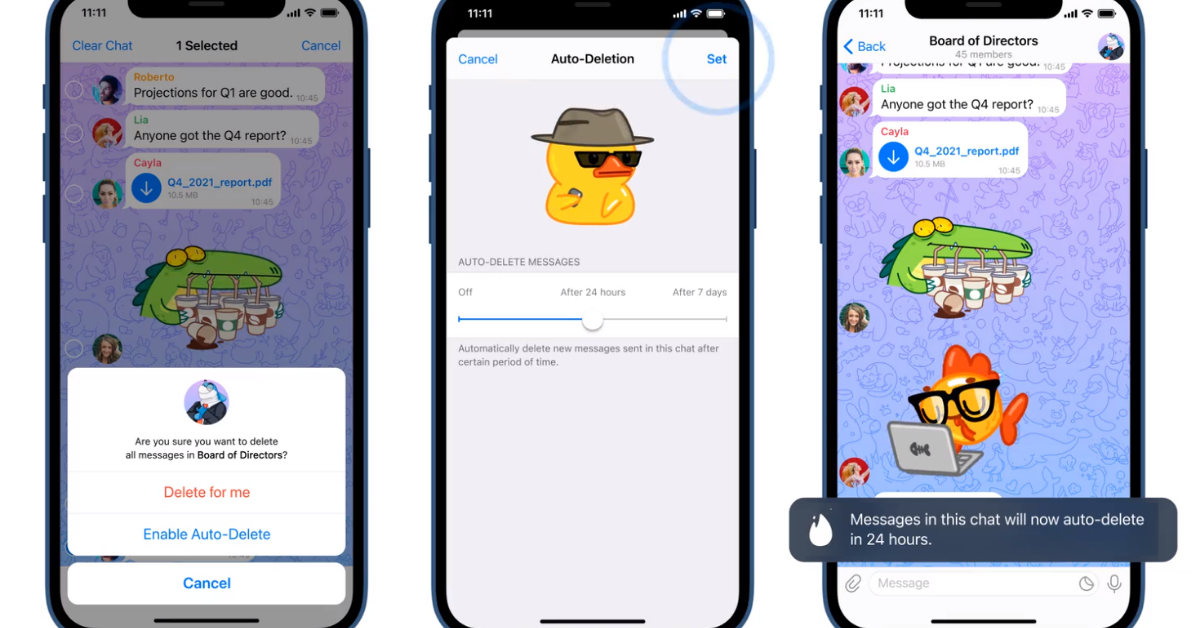
However, if you want to eliminate the possibility of your chats being decrypted or intercepted, you should choose secret chats over cloud chats on Telegram. Secret chats are end-to-end encrypted (between only you and the recipient) and are never uploaded to a server at all.
How to Delete Cloud Chat Messages on TelegramIf you don’t want your messages to be stored in the cloud, you can easily delete them from the chats. You can delete messages from any one-on-one chat, and from any device. You can delete both the messages you sent, and the messages you received. It doesn’t matter how long ago you sent or received the message – there’s no time limit.
To delete messages from a Telegram chat, follow the steps below.
When you’re finished, the message will be gone from either just your device, or from both your and the recipient’s devices, as well as the Telegram server.
If your chat has more than 2 participants in it, you can still delete the messages that you already sent from everyone’s devices. However, there’s a time limit. You can only do it within 48 hours after sending the message. After those 48 hours, you can still delete your message, but from your device only. The message will remain on other participants’ devices, as well as on the Telegram server.
The same applies to Telegram users who are using an old version of Telegram prior to version 5.5. In that case, even if it’s a one-on-one chat, the 48-hour rule applies, and you won’t be able to delete the message for everyone afterwards.
If 48 hours have already passed since you sent the message, the only way to completely erase it is to ask the recipient (or recipients) to delete your message from their devices. After that, the message will also disappear from the Telegram server.
If complete privacy’s what you’re after, consider using secret chats in Telegram over the normal cloud chats. To open a secret chat with someone, select their username on Telegram, then select More (three vertical dots in the upper-right corner) > Start Secret Chat.
Inside the secret chat, the process of erasing messages is the same as described above. However, you might not need it if you set your messages to self-destruct. Open the secret chat and select More. Then select Set self-destruct timer. You can then choose how long the recipient will have until the message disappears from the chat.
With the self-destruct timer, the messages will automatically disappear from your secret chat after a set time. They’ll also disappear from the other person’s device, as well as from the Telegram server.
Secret chats aren’t the only chats where you can set your messages to self-destruct. You can set your messages to automatically disappear after a certain period of time in any chat on Telegram. To enable the auto-delete feature, follow the steps below.
You can choose your messages to disappear either after 24 hours, 7 days, or in 1 month after you send them.
How to Delete Entire Chats in TelegramIf you want to get rid of an entire conversation on Telegram, open the app and select it. Then select the bin icon on top of the screen. You’ll see a pop-up message asking whether you only want to delete the chat for yourself, or for both you and the recipient. If you choose the latter, the chat will disappear from both your devices and from the Telegram server.
Being able to delete a message from someone else’s device after you have already sent it can potentially save you from having to explain yourself later. The feature is similar to Gmail Unsend, and is a lifesaver when you send a message to someone by mistake.
However, don’t forget that while you can prevent the recipient from seeing your message, you can’t disable push notifications on their device. When you send a message to someone, it’ll appear in their notifications. Depending on their settings, the recipient might see the contents of your message even if you already deleted it. Even though your message won’t appear in Telegram, the user can take a screenshot of the notification and keep a copy of your message that way.
One final option for those who want to erase all of their messages from Telegram is to delete their account completely. If you don’t want Telegram to store copies of any of your messages, make sure you also delete all of your conversations for yourself and for other users as well.
Have you thought of deleting all of your messages from Telegram? What option do you use for deleting messages from the app? Share your experience with Telegram chats in the comments section below.
';document.getElementsByClassName("post-ad-top")[0].outerHTML='';tocEl.outerHTML=tocHTML+newHTML;}}catch(e){console.log(e)}
Anya is a freelance technology writer. Originally from Russia, she is currently a full-time Remote Worker and Digital Nomad. With a background in Journalism, Language Studies, and Technical Translation, Anya couldn't imagine her life and work without using modern technology on a daily basis. Always looking out for new ways to make her life and location-independent lifestyle easier, she hopes to share her experiences as a tech- and internet-addict through her writing. Read Anya's Full Bio
Subscribe on YouTube!
Did you enjoy this tip? If so, check out our very own YouTube channel where we cover Windows, Mac, software, and apps, and have a bunch of troubleshooting tips and how-to videos. Click the button below to subscribe!
Subscribe
If you recently switched from WhatsApp to Telegram to protect your chat privacy, you might want to know how to delete chats from both your device and Telegram servers. It's not as easy as you think.
Telegram
Developer: Telegram FZ-LLC
Price: Free
There are two main types of chats in Telegram: cloud and secret. Cloud chats exist between you and other Telegram users (including public groups or channels) and are not end-to-end encrypted. Secret chats are never uploaded to the server and are encrypted between sender and recipient. nine0003
Telegram states that cloud chats are "stored securely encrypted, with encryption keys in each case stored in several other data centers in different jurisdictions" to protect your privacy. Without end-to-end encryption (when only the sender and recipient can decrypt messages), your chats can potentially be intercepted even if they are encrypted on the server or application.
In addition to this, cloud chats are (as the name suggests) stored in the cloud. This makes it easier to use Telegram across devices as you can easily download chats and message history. nine0003
Starting with Telegram 5.5 (released in March 2019), anyone can delete a message from a private chat from all devices. This includes both the messages you have sent and the messages you have received.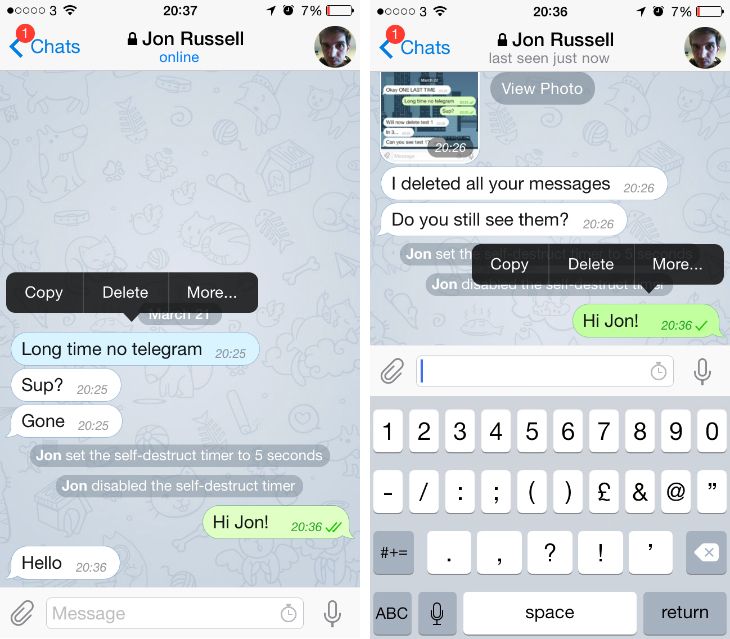 There is no time limit and the message will be deleted from all devices including the Telegram server.
Cloud chats with multiple participants work differently. You can only delete messages sent from all devices within 48 hours of sending them. After that, you can still delete the message, but it will remain on both the server and the recipients' devices. If the recipients also delete the message, it will be gone forever. nine0003
To delete a message, press and hold it, then select the trash can icon in the top right corner.
You can then choose to delete the message only for yourself or for the other party as well.
If you or the recipient are somehow using a version of Telegram prior to 5.5 in a private chat, then you are subject to the same 48-hour window and rules currently in place for cloud chats.
If you want to delete all copies of such a message from the Telegram servers - even the recipient's copy - you also need to ask the recipient to delete it on their device. nine0003
Being able to delete a message from the recipient's device sounds nice, but push notifications are handled differently.
If you send a message to a friend who has push notifications enabled for Telegram (the messaging app is useless without them), your message will still appear in their notifications. Most mobile devices remove notifications after being clicked, but most still contain most of the incoming message. nine0003
Thus, although your message will not be displayed in Telegram, the user can take a screenshot of their incoming notifications and store the message indefinitely.
Want to delete everything you've ever sent? For this option, you can delete your Telegram account. But if you have sent sensitive messages containing personal data to anyone, you may need to ask them to remove their copies of those messages from your account to ensure that all copies are removed from Telegram's servers. nine0003
Cloud chats are convenient and for ordinary conversations about what you are going to eat for dinner, they are not particularly dangerous. However, if you are serious about protecting your privacy, you should use Telegram Secret Chats. To do this, click on the recipient's name at the top of the chat, click the menu button in the upper right corner, and then select Start Secret Chat.
If you use Telegram, you must have encountered situations when you need to remove one or another element (files, history, chats, etc.), or maybe even the messenger itself.
Today we will tell you how to delete messages in Telegram in group . You will also learn how to completely remove the application itself from your device.
What content can be deleted in Telegram?
To begin with, let's talk about what can be removed in the messenger and in what cases such a need arises.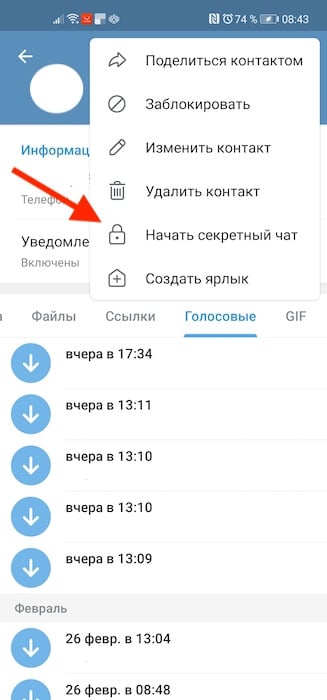
Files of any type can be removed from the chat at any time. It is important to know that if the interlocutor did not have time to read the SMS, then it can be deleted from both sides. If he managed to read it, then it will be removed only from you.
Usually resort to this action when the file was sent by accident, to the wrong user, or in cases where you just need to clear the chat history or device memory. nine0003
Everything here is similar to files. You can remove any SMS at will. If it was sent by you, you can remove it from other participants in the conversation (if you haven't read it yet). If someone else - only at home.
Most often they are deleted when the conversation history is cleared or if it was sent by mistake.
Posts are content on channels. In groups / supergroups, posts are regular SMS. Only the administrator has the right to delete a record (news). The reasons may be different. For example, outdated information or history cleaning. And they are deleted in the same way as messages. nine0003
Subscription can be removed, both your own (if you are subscribed) and someone else's (if you are subscribed). In the first case, everything is simple - for example, you changed your mind about being a subscriber of a particular channel / group and therefore unsubscribe. In the second case, for example, you are a channel admin and want to remove some subscribers.
Depending on the type of chat, the history is deleted differently. If this is a normal dialogue or conversation, then deletion is carried out manually by calling the chat menu and selecting the appropriate item. If this is a secret chat, then here you can resort to both manual and automatic deletion. In the second case, this is done using a specially configured timer. nine0003
As you know, all search history is stored in the cache on your device.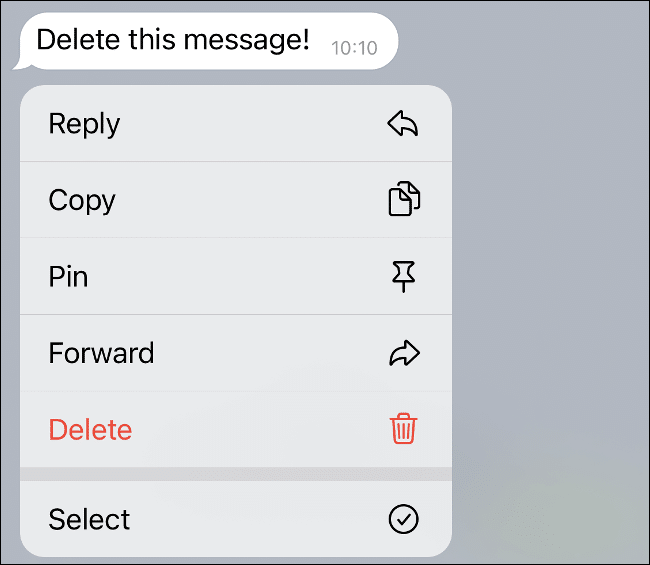 Removal is carried out not through the messenger itself, but through special software or in the settings of your phone.
You can delete a conversation in two ways: by entering and not entering it. There is no difference between them, this is done only for convenience.
It is important to understand that only you can delete a conversation. If, say, there are a certain number of participants in it, then you will simply leave it (if you are an administrator, you can still clear the history). nine0003
Deleting an account also deletes all data associated with it (personal information, dialogs, files, etc.). This is done for various purposes. For example, your device (smartphone) has been lost and for data security purposes, you can remove your account from the PC version.
It is worth noting that everything that we have described above is permanently deleted. That is, you will not be able to restore the deleted. Therefore, be extremely careful when resorting to such measures.
Next, we will describe the step-by-step removal procedures for each of the above items. Some of them are removed in almost the same way, so we will combine them in one instruction.
As for files, all photos, videos, songs and documents are cached on your device. Therefore, to begin with, decide what exactly you need to clean: the device’s memory or chat history. In each case, the procedure will be different. nine0003
To delete downloaded files from the device:
If you use the desktop version of the messenger (for PC), then just find the desired file on your computer and remove it.
To delete files, sms and posts from the history on the PC version of the messenger, do the following:

On mobile devices, this procedure is similar. There is only one minor difference - when you select several items, a trash icon will appear at the top, by clicking on which you will delete them. nine0003
People often unsubscribe from certain channels, and admins often exclude inactive users. In both cases, the subscription is deleted. Next, we will discuss these processes in detail.
Unsubscribe on PC - there are 3 ways:
 nine0118
 Unsubscribe in the mobile application - there are 2 ways:
Unsubscribe from the Telegram channel from mob. phone 1 way
The 2nd way to unsubscribe from the Telegram channel is to press the Leave channel 9 button0003
After we confirm the action. Thus, your subscription will be deleted.
Now let's look at the procedure for removing subscribers by administrators. On PC:
 nine0118
 On the mobile app:
To clear the history of any conversation, follow these steps:
You can also enter the dialog itself, click on the three dots at the top and select the appropriate menu item.
Similarly, this procedure is carried out in a mobile application.
As we said earlier, the entire search history is stored in the cache. Therefore, to clear the history of search queries in Telegram, you need:
 nine0118
 Clearing the cache clears the search history.
Done!
There are two ways to delete a group/supergroup:
On mobile devices, this process is carried out similarly. We also remind you once again that you do not delete the chat completely, you just leave it. And if you were an administrator, you can also delete the history.
People resort to this action in extreme cases, since it will not be possible to restore the profile in the future. These are the Telegram rules. nine0003
In order to remove yourself from Telegram, follow these steps:
Deleting your account from the Telegram messenger
How to delete your Telegram account completely, you just have to click on the Done button!
Done! Your account has been permanently deleted. All personal data and chats are also erased. Further recovery is not possible.
Among the users of the messenger, there are those who do not like using it and therefore, they are wondering how to completely remove the application from a smartphone or a program from a computer.
Below is a step by step guide for PC. In it, we used the rather popular CCleaner program (not advertising). You can also use another similar service.
Also, after removing Telegram from the computer, you can clean the registry in the same program. nine0003
Thus, we removed Telegram from our PC.
For Android:
On iPhone (iOS)s, this procedure is similar, only it is carried out in the App Store.
In the Telegram messenger there is a kind of "Black List". Each user can block another.